Here's my anecdote: In 2006, while sitting at my desk playing a video on the hard disk drive of my Thinkpad T22, I held a single neodymium magnet (harvested from an old hard disk drive) about 6 inches from the left side of the unit (where the ~40GB-ish Travelstar 2.5" PATA disk was located). The video froze, Windows XP blue-screened, and the hard disk drive started emitting a ~10Khz whine. I jerked my hand away from the PC immediately when the whine started.
BIOS would no longer detect the disk on that machine, or any other I tried it on (on both USB-to-PATA and honest-to-goodness motherboard PATA controllers). The drive spun up but made a repeated ticking sound (I assume seeking back and forth looking for servo tracks).
I sent the drive to Kroll Ontrack (because, stupidly, I had billing data that wasn't backed-up on the drive). The report I received back indicated that 80% of the drive's sectors were unreadable.
As an aside: The data I was looking for was ASCII text and Kroll Ontrack was completely unhelpful in just sending me a bitstream image of the drive so I could grovel thru looking for data I needed. Being plain ASCII, their "file carving" tools didn't locate any of the data. (They sent me a "preview" of the data they'd located, and while it got lots of Microsoft Office-format files, it didn't have any ASCII text files). I offered them a 3x multiple of the rate they asked for file-level recovery to simply send me the bitstream image of the disk that they'd already made. They wouldn't do it, and wouldn't even let me pay to talk to somebody who understood what I was saying. I ended up taking a major loss on the billing data I destroyed. I'll never recommend them to anybody.
I won't ever play with neodymium magnets around spinning rust media again.
1) external magnet messed up heads movement closed control loop (internal drive's magnets + voice coil + positioning marks on the platters), and as a result head actual position became different from what controller thought it was.
2) control loop tried to correct itself, repeatedly failing, all while head kept moving across the platters, while controller was still thinking it's elsewhere.
3) controller was writing to disk, so it overwrote data in highly irregular tracks that followed erratic head dance. some of that overwrote positioning markers.
4) when recovering, even though 99.9% of data was still there, controller failed to position the head on erased markers, so reported "unreadable sectors"
From 6 inches away? Unless this was a hockey-puck sized magnet I'm calling it a coincidence.
> (harvested from an old hard disk drive)
Okay, this is making even less sense. "Hard drive magnets", in a drive, are millimeters from the spinning platters. I refuse to believe that the same magnet, moved 6 inches away from the computer caused catastrophic damage.
I will definitely concede that the 6" number may be an incorrect memory. It certainly may have been closer, but it wasn't right on top of the unit.
If it was a coincidence it was certainly well-timed. I don't have the Thinkpad anymore, but I do still have some 2.5" PATA drives. It might be interesting to test this and make a video.
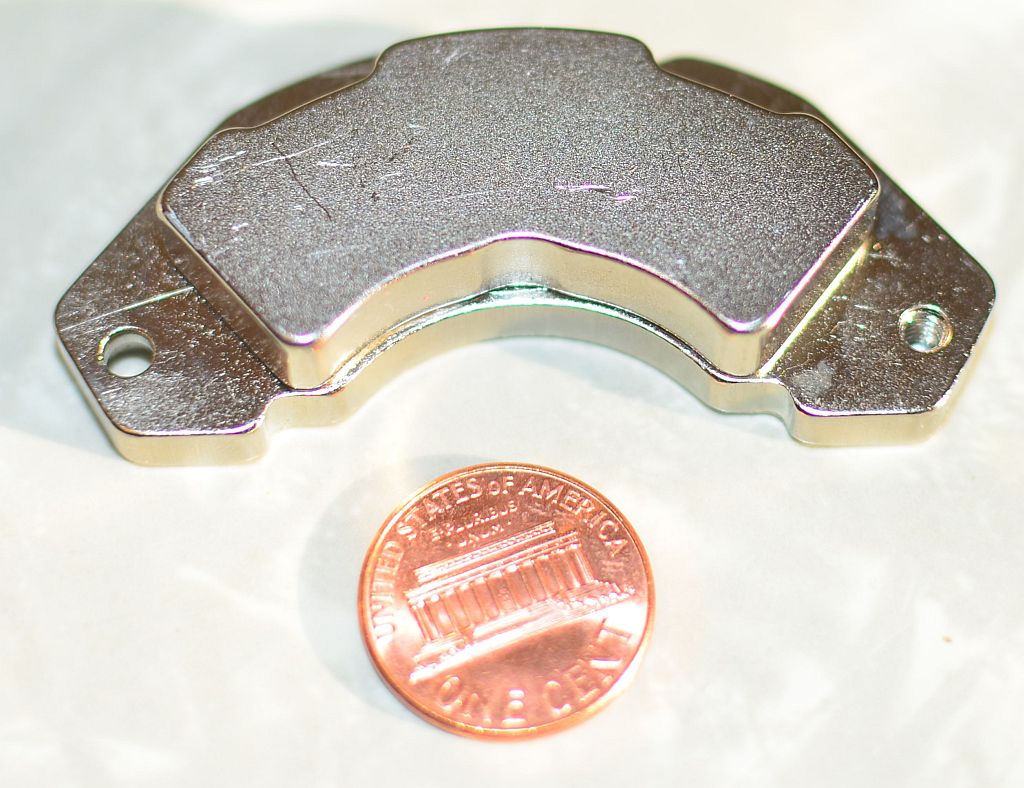
This magnet was pulled from a Micropolis 9GB SCA-II 3.5" low-profile drive dating from roughly 1998 (I had a crap-ton of these drives and, as they died, I pulled their magnets, so I have a bunch of these). These particular magnets will stick to each other thru my 3" thick butcher block table. They are physically larger (substantially thicker) than the ones I've pulled from newer drives.
Edit:
I assume that the data and servo tracks written to the drive are done so in the presence of the magnetic flux of the magnets supporting the voice coil. I always just assumed that adding a substantial new source of magnetic flux (the magnet in my hand) either induced a current or magnetized some component in the drive.
>> They are physically larger (substantially thicker) than the ones I've pulled from newer drives.
Not really, they look very close in size to current Enterprise Drives (https://imgur.com/2HjuuKM), Of course I have removed the Metal backing plate from mine
Now consumer drives do have smaller magnets (that is one way to save cost)
Here is a photo of the 4 styles of magnets I still personally have, the smaller magnets are either out of consumer drives and 2.5in drives manufactured in the last 7 years https://imgur.com/59XjVPm
And just for fun a small assortment of my collection because why not
I've only had the opportunity to tear down a few consumer drives in the last few years. I haven't seen inside an enterprise-class drive in a few years. (I've stopped dealing with hardware directly for my Customers, and I haven't purchased much hardware for personal use over the last few years.)
I've found scavenged hard drive magnets to be very useful for odd jobs. One served several years holding up the fallen head-liner over the drivers seat in one of my crappier cars.
Yeah, I hope people realise that everybody has these magnets IN their computer. You might have a NAS in which case you have several of these magnets much closer than 6 inches to the other drives and power supply and nothing happens.
Magnets near your or even on the computer do nothing.
Yes. The magnet is stationary and the spinning drive plate is moving the data, the conductor, very rapidly relative to the magnet. (imho the real issue is the large metal box surrounding the drive plates. It's hard to feel a magnet from inside a metal house.)
No, what he is saying, is that moving magnetic field, induces current, and can mess up the cheap power supply and/or other components, which can then mess up the drives.
In a server, the power supply is on the other end of the chasis. In a laptop, it's a lot closer to the internals.
Instead, why don't you take a multimeter and see if you can measure any voltage (never mind current) by moving a magnet, by hand, near a single non-coiled wire.
Well honestly, I wrote that because I wasn't sure what to reply. I'm taking in five comments about power supplies, tons of wrapped wire, and I get a reply about a single wire.
Nobody is suggesting that electromagnetic theory is false. The question is whether there's really a danger from HDD magnets in motion relative to nearby electronics or HDD platters.
- HDDs often live right next to each other (separation of roughly 1cm, front to back).
- Power supplies and their induction coils are right next to the drives in some cases, including for instance consumer grade NAS boxes.
- HDDs tend to have a coil of wire, too.
If HDD magnets overwriting nearby HDD data was a thing, it would be happening all the time.
If HDD magnets in motion in certain orientations were inducing damaging currents in nearby HDDs or in nearby power supplies which then damaged connected components, that would be happening less often but still all the time. Not all chassis designs have power supplies at the opposite end as the disks, and some applications like consumer NAS boxes have them in close proximity to each other.
The magnetic head that writes to the disk, is fairly small and close to the platter. The flux is very contained. So that part seems negligible in the overall scheme of things.
Who's talking about the field from the magnetic read/write head(s)? This is about the permanent magnets built into spinning hard drives, and what those permanent magnets might do to nearby disk platters, or, when in motion, might do to coils of wire in nearby electronics.
Either some extremely unfortunate and rare positioning and orientation and motion of the magnet occurred, which barely exceeded the design limits of the drive or power supply or other circuitry (or maybe the laptop hdd or circuitry was shoddy and shouldn't have had a problem but did), or this is a major problem that's gone unappreciated among computer and NAS builders for decades, or it was an extremely unlikely coincidence.
This can't happen either. Early hard drives (and I mean early: the 80s) needed precise head alignment (in respect to the how far the head is from the center of the platter) in order to read or write data in the correct location. If you've heard of "low-level" formatting, that's when a on-platter layout unique to the head and head movement mechanisms of the host drive is created.
Modern drives, however, are designed to "follow" the tracks that are cookie-cutter imprinted onto the platters. We use this design now as it's far easier to design a head that reads tracks and makes slight adjustments to stay on track, vs a head that needs to move to an absolute exact position.
In other words, modern drives are designed to combat this exact problem.
Absolutely. Hard disk drives don't stick to your refrigerator (like a naked magnet does) either. My layman's guess would be that the fields generated by the magnets in opposition in the voice coil are somehow "balanced", so that the net magnetic field produced by the drive is negligible.
It was around Christmas, and a lot of people seemed to be out of the office for vacation. My sales rep was not technical and didn't understand what I meant when I asked for the "bitstream image" or "raw image" of the drive. I kept pressing, leaving voicemails in which I said stuff like "Look-- you don't know what I'm asking for. Send this to somebody in your engineering department and they'll know what I mean. I want to give you more money than you're asking for to get this."
Eventually I got a call back from somebody saying that they understood what I was asking for but couldn't send it to me. At that point I got fed-up and paid the minimum bench fee and asked for my disk back. I probably should have pushed the issue further, but my need was timely and I'd already started reconstructing the data from other sources.
It was a Travelstar (I believe still under IBM ownership at that time) 2.5" PATA drive. I don't have the exact model handy. I took a look in my "dead disks" shoebox and I don't believe I even have the drive anymore. If I run across it I'll drop a comment on here.
That was my "take away" to "playing with magnets around spinning rust media". It has nothing to do with my attitude toward data backup, or with playing with magnets in general. I have no desire to induce further failures in any other spinning-rust media.
It was a failure in following disciplined practices, in this instance, and it caused me monetary loss. It was a good lesson. I am happy with my attitude toward data security and data loss, and it's certainly not codified in the statement "never play with magnets".
If you want to get rid of a harddrive with sensitive data I would first suggest that one gets familiar with the thought of not being able to sell it as used.
Personally for my drives, I use Boot and Nuke to erase the drive three times, first with zeroes, then with random data, then with zeroes again. After that I disassemble the drive, put a strong magnet over each platter, shredder the drive into almost powder, burn the pieces in a fire and then throw away the leftovers. Probably overkill but I want to be certain.
You jest, but jackass security people would probably be dissatisfied that your PII might be accessible to some alien race when after the earth explodes in 5 billion years and some remanent of data is somehow recoverable from an asteroid made of cooled lava.
I recall one datacenter consolidation project where the hard drives from decommissioned servers were zapped with a degaussing device, shredded, and then somebody signed off that they were dumped in a furnace somewhere. (At some ridiculous expense)
Meanwhile, the normal operation bins of drives that were in little blue bins for collection where just picked up and moved by the moving men, and are probably still in some closet in the new facility!
Self-encrypting drives (SEDs) have this function built in:
1. Everything stored on the drive is always encrypted when at rest.
2. The drive has some sort of firmware, memory and microprocessor that stores a key and en/de-crypts data in transit to/from storage.
3. To 'erase' the drive, the SED simply erases the key.
Of course there are many potential flaws in implementation, but conceptually it's simple. And as with most drive encryption solutions, the fatal flaw is that the data is available if the computer is on or asleep, which means that for most users the security is disabled 99% of the time (but that problem doesn't apply to drive wiping).
AFAIK: Many common drives have SED functionality. Until the user "locks" the drive, the data is en/decrypted invisibly to the user and system. Locking the drive creates a passphrase and a pre-boot environment for authentication. Locking the drive requires an OS-level utility. Opal by TCG (the same people who provide the TPM spec) is the common standard.
Well your password could be brute-forced unless it's really long and random (about 20 chars). There might also be flaws in the encryption code. And changing it later won't work, because old sectors might still be recoverable, even if they are overwritten.
Usually with full-disk encryption, your supplied encryption passphrase is used to encrypt a single sector (or redundant set of sectors, spread across the disk) containing a much larger master key, which is in turn used to encrypt the rest of the sectors. When you change the disk password at the OS level, the master key remains the same (which is why you don't have to wait for the disk itself to re-encrypt); the single sector containing the key is just re-written to be encrypted with your new password.
Later, when you actually reformat the drive, you (or your OS) should spend some extra time writing over the sector(s) containing your encrypted FDE master key. But only those sector(s) need to be securely wiped. Even if someone can brute-force the password you used, they won't have that sector to use to turn it into a decryption key for the sectors; and they definitely won't be able to brute-force the FDE master key itself.
And, to make matters better, in systems with a TPM (most, these days), the TPM holds the FDE master key, and does the job of "shredding" it when it's no longer needed itself, as an async job kicked off by the OS along with the reformat. Also, in such systems, the FDE master key is never loaded into RAM, because the TPM itself does the sector-wise encryption/decryption as a DMA process.
You can overwrite a physical sector in modern drives, at least not in a standard way. That’s because they contain internal controllers that map physical to virtual sectors.
I take the point, and my passphrase is a phrase so perhaps subject to dictionary attack of a sophisticated nature. At the end of the day, this is all about the level of risk one expects. Mine is 'don't want some random petty thief finding my credit card number' rather than 'don't want some government agency reading my old emails'.
I wouldn't bet on that being a 100% deletion. It'll probably trash most of the data but not all.
Thermite grenades aren't very good at melting a huge chunk of metal either, sure it'll go straight through a machine block but it won't melt the entire machine block.
To destroy all data on a harddrive all parts of the platter must be destroyed and heated to their Curie point.
If you check research related to this and the DEFCON talk where somebody actually put thermite into the drive, there won't be a puddle of molten metal.
You can put thermite on it once you burned the parts if you want.
The DEFCON guy used 15 grams of thermite. An AN-M14 TH3 incendiary grenade contains ~750 grams of thermite (technically thermate). Those are two different things. Entirely.
A tokamak or a stellerator are also fit for purpose. The advantage is that the toridial magnetic fields that contain the fusion plasma also give the surviving bits another good hammering before vaporisation.
I worked in the HDD industry, doing signal processing for a few years. HDDs are pretty much magical. It's insane how delicate, yet robust it all is.
But to put things into perspective with some numbers, the write heads on a modern HDD use somewhere on the order of 50 mA of current. That may sound like a reasonable amount until you consider that the magnetic field [flux] is condensed down to a 60 x 20 nm area. It usually takes a little over 1 Tesla to flip the magnet.
I have been out of the Industry for a little bit now, but things are moving towards a magnetic substrate that has a smaller grain size (allowing smaller bits at a similar SNR) but a coercivity well over 3T at room temperature.
> HDDs are pretty much magical. It's insane how delicate, yet robust it all is.
Absolutely. It's bloody amazing how my laptop has a device with finger-sized actuators that read/write bit cells that are about as small as couple-year-old semiconductor feature sizes -- and that can survive mistreatment that one doesn't usually associate with micromanipulators.
Hard disks are surprisingly hard to destroy on-demand. There was a DEF CON 23 talk [1] exploring ways to quickly wipe your servers in situ using physical methods.
SSDs internally yes. Any modern SSD simply uses some random key unless you specify another one. Shredding is as simple as telling it to shredder the key, end of story.
Some harddrives do this too, I believe but it's not as widespread yet.
I think magnets could compromise the read/write head, or other electronic on the drive. So why not just mulch the drive with a grinding service?
If you're looking to reuse the drive, use one of the NIST SP 800-88 Revision 1 recommendations. It lists the methods in the preferred order. Ideally the drive supports ATA crypto secure erase, where it just wipes the DEK and KEK, poof, in effect the crypto encoded form of you data can no longer be turned into plain text. You can mimic this with software FDE (Bitlocker, LUKS/dm-crypt, Filevault). Fast.
But they also say it's adequate to use the other kinds of secure erase, because other than firmware bugs/exploits it's the only way to erase sectors not assigned an LBA, e.g. sectors that once had an LBA, had data written to them, but subsequently failed overwrite and the LBA remapped to a reserve sector, leaving data on a sector that cannot be overwritten via SATA commands.
HIPAA - regulated health data requires physical destruction of retired hard drives. Usually this is done in sight of a video camera. The operator shows the drive's serial number to the camera and then drops it into the grinder.
CMS (Centers for Medicare and Medicaid Services) can require proof of destruction. That video does it.
This is exactly how I got out of a final project in middle school. Wiped my HDD with a Neodymium magnet right before the deadline and claimed my computer was "broken"... Of course this wasn't done for highly paranoid reasons where I needed to ensure the data was really all gone, but funny story nonetheless. People are more sympathetic when they think a computer "randomly" stopped working.
Alas, such a strategy will not work at universities local to me (UK). They specifically exclude computer malfunction as grounds for extenuating circumstances.
Something similar is indeed the right answer here.
You have to take the material above its curie temperature (https://en.m.wikipedia.org/wiki/Curie_temperature) and then according to physics all preexisting magnetic information is lost.
What I've done is not that dissimilar. It's pretty easy to build a furnace out of basic household items. With charcoal and a leafblower, you can get it up to a temperature where an entire HDD will melt or burn.
There are techniques used to recover previously erased information on HDDs. These techniques have been available since the 90's. The best way to make it unrecoverable is to melt the disks by the use of whatever techniques you have available, including ox-acetylene torches (the favoured method for the company at the time I was working for them), putting into a furnace (as suggest by others here), etc.
The problem with erasure is that there is residual amounts of magnetic fields that can be picked up by the right equipment. In the day, it was reported that they had success with recovery of information that had been overwritten by 8 - 10 times. It just took a lot of patience to do so. Those who want to recover this information will have that patience.
These techniques are theoretical from the time HDDs needed a user low level format(think RLL controller in your XT), and even then a myth nobody ever demonstrated in practice.
Is it really necessary to overwrite the data multiple times to erase it? With the densities provided by today's hard drives, the techniques you used to be able to use to get partially erased data are routinely used by the disk drive itself for normal reads.
What's your threat model? Data must not be recoverable for at least the next X years, or data must not be recoverable within any future time frame, no exceptions?
For the former, you're absolutely right. For the latter, multiple-pass overwrite provides greater assurance than single pass. Following that up with physical destruction of the platters provides further assurance.
Timeliness, usually. Destruction is usually a batch job so if you care about risk of data exposure in the time lag between being able to wipe the drive (usually an online, relatively low-hassle activity) and destroying the drive, wiping is worthwhile.
Again, thread modelling is crucial. There may be no point wiping!
It's totally not required to wipe it/over write it more than once. I wish I could find the reference, but someone made a fairly comprehensive attempt to read data that had been over written once and they couldn't detect anything.
The required equipment makes magnetic data unlikely to be recoverable except in exclusive cases where certain government agencies with sophisticated labs get involved, but in short, storage leaves lasting (trace) physical changes behind.
SSDs and operating systems without proper Secure Erase support can very easily leave behind complete data.
When I had a few old hard drives to dispose of I drilled several holes in each one, through the case and platters, then filled them with water and left them outside for a few days so that anything that might rust would do so.
even if you drill a hole in the drive, data can still be recovered from it. anything that leaves large pieces of drive intact really isnt ideal. over the years i had collected dozens of platters from both myself and other people. for some reason, when i was younger i was obsessed with collecting hard drive magnets and also smart enough to understand that i probably shouldnt throw the platters away. so a few years ago i decided it was time to destroy all of these annoying platters that i have to worry about misplacing. i naturally assumed that it was going to be easy to find some kind of service, shredding or wiping, for hard drives or hard drive platters. there were no good options. so i tried smashing the platters into small pieces, and this worked for some of the thinner laptop hdd platters. one strong hit would break them into millions of tiny pieces. but most of them just bent or dented. and to thoroughly bend and dent the whole surface of all the platters would be super annoying. so i decided i should just melt them -- they are made of aluminum which has a low melting point. it was surprisingly easy. just get an old coffee can or better yet a stainless steel gas cylinder or even a ceramic crucible. they arent too expensive as far as i know. i used a can. then just surround the can with some bricks for insulation and apply a normal blow torch. set the torch down so it blows into the void between your vessel and the brick jacket. after the platters are melted you can even cast them into something, like a belt buckle. its all a bit silly, but it does feel nice to know that it is literally impossible for anyone to ever know what was on those platters.
Even if the test would have succeeded, this is a bad idea.
With a magnetic swipe card that you demagnetize so it is no longer read successfully, you may well be able to recover the information using a better reader.
Depending on drive age the same may be possible using a hard drive.
The best option for modern drives is still to use software to wipe the drive and if reuse is not required destroy the reading mechanism and platters.
I won't say it's completely impossible, but modern HDD read heads are already close to our technical limit, and the signal they get is so noisy as to require extensive processing.
There definitely was a period where labs could recover data this way, but I think it's passed.
Hard drives automatically remap bad sectors, so even if you overwrite 100% of the accessible data, you may still have left pieces of data in remapped sectors that weren't overwritten. If your drive supports the SECURITY ERASE feature, then it should overwrite those blocks too.
Though if you really want to sell or give your drive to someone else, the best thing to do is to use full disk encryption from the beginning, then there will be no plain text data on the drive.
And that's probably why the single pass of zeros is considered adequate, and why a single pass ATA Secure Erase or Secure Erase Enhanced is better than that.
For quickly destroying hard drives, drive big nails through the entire case in several places. Restoration is at least very manual and annoying, in many cases not worth the effort.
If you need more security, building a simple furnace isn't too hard:
You don't need to go that fancy. Just use a small steel drum, with holes punched around the bottom, sitting on bricks. Burn dry hardwood, plus occasional chunks of paraffin. Everything burns off, except for the steel.
Best method is to use LUKs and then wipe the master key. Luks has a forensic stretching technique to take a 32 byte master key and stretch it to 1 MiB, such that loss of a single bit means the original key is unrecoverable.
That really helps you wipe things like SSDs which can copy and migrate data, and make it hard to be certain you destroyed a sector
> such that loss of a single bit means the original key is unrecoverable
That can't be right (I don't know anything about this though). If you control the data (with a non-interactive non-destructive decryption process), a loss of a single bit just means you have to test two possible keys. In terms of brute forcing, the security is the same per number of bits lost. The benefit of using a large key would be that if you lose a certain fraction of your key (say 10%), then that would correspond to more bits (as long as you erase 128 or more bits you'd be fine).
Also beware of key stretching, use it only when absolutely necessary. Key stretching doesn't modify the ratio of work necessary for your encryption/decryption vs the work necessary for brute forcing -- i.e. it doesn't improve the security factor. You're essentially doing an economic defense vs a mathematical one, and hoping that computers won't improve and your attacker isn't willing to spend much relative to what you spent.
A friend uses a saws-all (or something of that ilk) and cuts them in half. I'm figuring on taking my old drives to him for that treatment. I don't want to resell them and have a casual snooper recover my data, and I'm not of enough interest for anyone to piece the halves together.
    Advancing technology has created a situation that has altered previously held best practices
    regarding magnetic disk type storage media. Basically the change in track density and the
    related changes in the storage medium have created a situation where the acts of clearing and
    purging the media have converged. That is, for ATA disk drives manufactured after 2001
    (over 15 GB) clearing by overwriting the media once is adequate to protect the media from
    both keyboard and laboratory attack.
That's an elaborate way of saying that zeroing a healthy modern disk is sufficient. No need to break out the crucible or jackhammers. If you really need to indulge your paranoia then use some wiping system that does multiple overwrites with random data. It's not necessary, but at least you won't put your eye out.
Right? What are the people in this thread doing that they're worried someone would take the time to employ theoretical, if not entirely hypothetical, recovery methods against a zeroed disk?
Someone once suggested to me drilling a hole through the platters, then using that hole to fill the drive with salt water.
I don't know if the salt water really adds to security, but for the type of data on my drives, just drilling the hole seems like more than enough - no one is going to spend $1000 to recover my 2014 tax return from my drive since there are far easier ways to get my personal data.
A ferromagnetic cage such as a hard drive enclosure can shield against magnetic fields pretty well. The field lines are concentrated in the enclosure and mostly avoid the inside. I would imagine you need to open the drive up to have much effect.
TFA said specifically that they could tell that the larger magnets were imposing a field inside the drive itself, and they could tell it was so because they could hear sounds coming from inside the drive. They presumed that the sounds were generated by deflection of the discs under the magnetic field. Therefore it is evident that the field is penetrating through the outer case.
They surmise that it was the higher coercive ty of modern drive plates that causes them to be resistive to reprogramming bits with a static magnetic field.
I normally unsubscribe from junk mail and advertising from e-commerce sites, KJ Magnetics is one of the few exceptions. I always look forward to their emails and blog entries.


BIOS would no longer detect the disk on that machine, or any other I tried it on (on both USB-to-PATA and honest-to-goodness motherboard PATA controllers). The drive spun up but made a repeated ticking sound (I assume seeking back and forth looking for servo tracks).
I sent the drive to Kroll Ontrack (because, stupidly, I had billing data that wasn't backed-up on the drive). The report I received back indicated that 80% of the drive's sectors were unreadable.
As an aside: The data I was looking for was ASCII text and Kroll Ontrack was completely unhelpful in just sending me a bitstream image of the drive so I could grovel thru looking for data I needed. Being plain ASCII, their "file carving" tools didn't locate any of the data. (They sent me a "preview" of the data they'd located, and while it got lots of Microsoft Office-format files, it didn't have any ASCII text files). I offered them a 3x multiple of the rate they asked for file-level recovery to simply send me the bitstream image of the disk that they'd already made. They wouldn't do it, and wouldn't even let me pay to talk to somebody who understood what I was saying. I ended up taking a major loss on the billing data I destroyed. I'll never recommend them to anybody.
I won't ever play with neodymium magnets around spinning rust media again.