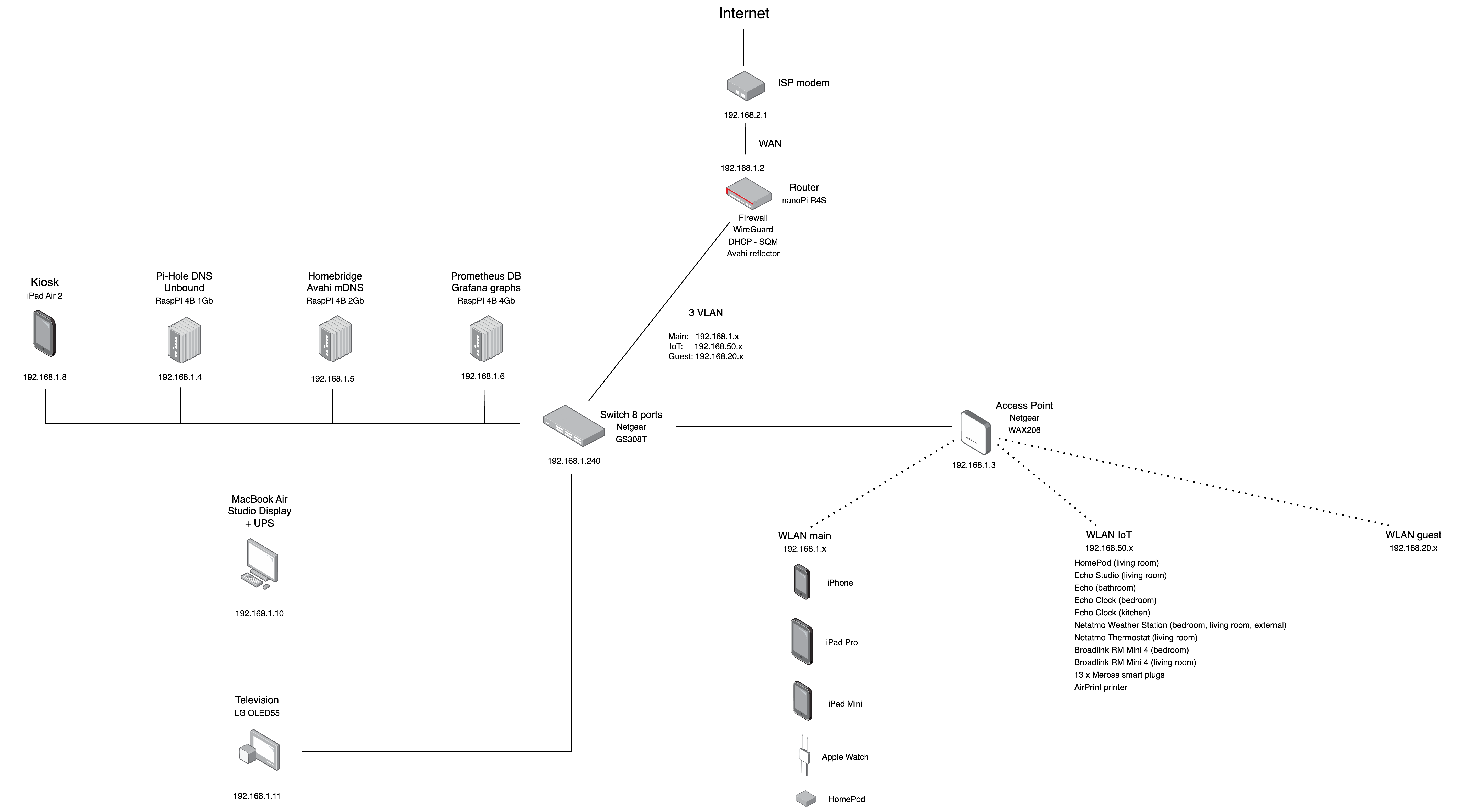
Very neat - thank you for documenting this, especially the piece about using Avahi to place the HomePods on a different VLAN. This is something I'm planning to do but hadn't looked into yet, so this will save me a lot of effort.
Just out of curiosity, that's the black box in your cabinet balancing on the metal cones?
>Very neat - thank you for documenting this, especially the piece about using Avahi to place the HomePods on a different VLAN. This is something I'm planning to do but hadn't looked into yet, so this will save me a lot of effort.
Yes, it's very easy if you use Avahi, but it's important that you're using VLANs and not subnets, because I had lots of troubles using a separate subnets for iot devices and the HomePod in the main subnet. You have to add a route on the router and tweaks the firewall. Using vlans instead is easier and faster.
>Just out of curiosity, that's the black box in your cabinet balancing on the metal cones?
Wait, does this work with HomePod minis? My current mDNS works with my network, my issue is the HomePod mini automatically jumps back to the same wifi as my phone.


Just out of curiosity, that's the black box in your cabinet balancing on the metal cones?