> I do memory/CPU traces like all day every day, and I fix code all the time based on that
So I take it you understand one of the standard visualizations produced by a CPU profiling tool, e.g. it takes a call stack sample every millisecond. The x-axis is time (one sample per ms, if you have only one CPU), and the y-axis is the call stack.
Now for a flamegraph, you basically have the same visualization, but you sort the samples across the x-axis so that callstacks that start with the same prefixes are grouped together.
Incidentally, the sorting of samples across the x-axis destroys the time information which is often critical. I constantly see engineers who don't understand flamegraphs looking at the entire flamegraph of a say 3 second trace, and then trying to use that whole flamegraph to optimize a 100 ms critical path within the trace, which is totally nonsensical.
Yeah, I imagine it, and still don't see how the flame graph would help?
Shown as a hierarchical bar chart, this would suggest 'b' is problematic.
Where, color-wise (because peak-wise, 'c' would be the culprit here) do I see this issue in a flame graph? Because I fear that either 'main' or 'a' would have the most dominant shade of red here?
Peaks don't matter, they just correspond to the depth of the call stack.
Probably the simplest way to use the flame graph is work from the bottom of the flamegraph and walk upwards until you find something interesting you optimize. Ideally you find something wide to optimize that makes sense. (The widest thing here is "main" which is obviously probably not the interesting thing to optimize, so you would work upwards from there.) The basic idea is that things that are wide in the flamegraph are expensive and potential things to optimize.
Where I work, we have tools that can produce diffed flamegraphs which can be really useful in figuring out why one trace uses so much more/less CPU than another.
> Probably the simplest way to use the flame graph is work from the bottom of the flamegraph and walk upwards until you find something interesting you optimize
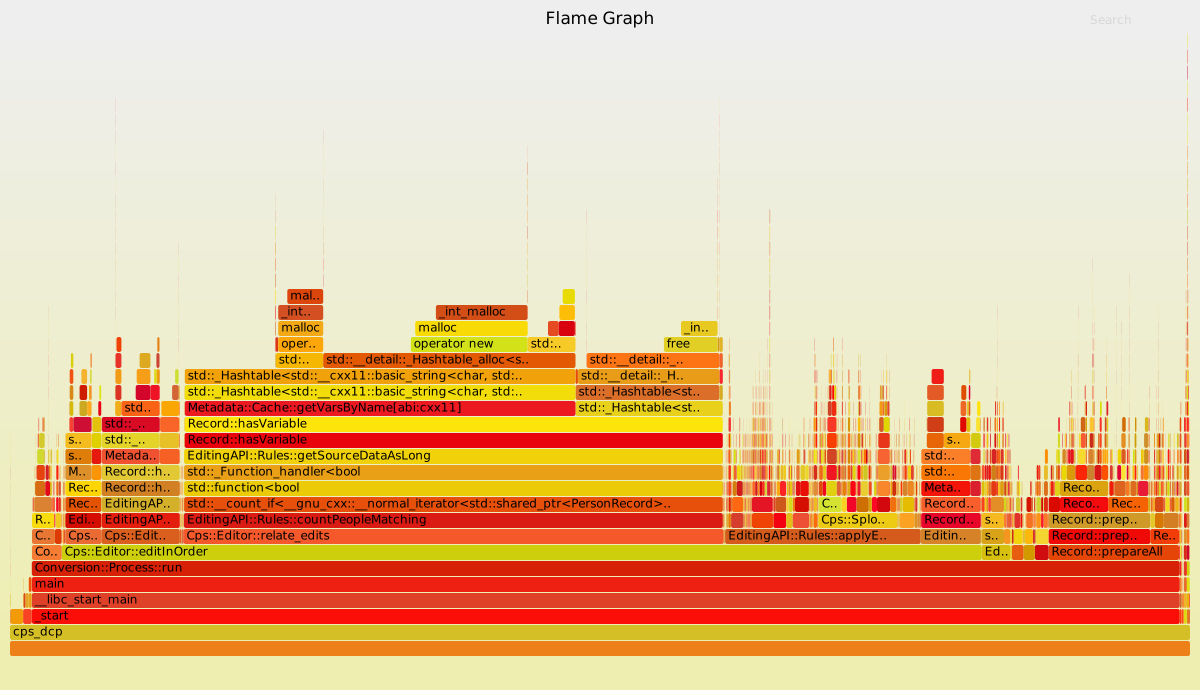
I work my way up. First thing that is really red is Conversion::Process::Run, but that probably wraps a lot of things, so I keep going up.
Next is Cps::Editor::relate_edits, or possibly EditingAPI::Rules::countPeopleMatching, because it's a darker red?
And then there is another red-ish function, followed(?) by some yellow-colored (and thus unimportant?) stack entries, and then the apparent culprit: Record::hasVariable.
The first function that is red being called from yellow-colored functions with about the same duration (width)? And if so, why is Metadata::Cache::getVarsByName not a more likely optimization target?
The colors are completely arbitrary! They’re just used to make it easier to see the difference between one stack and the next. They could just as easily be all the same color, it would just be harder to see the edges.
Other user here: Confession - I don't actually know what, if anything, the colors mean in a flamegraph. They seem random to me.
The way I'd personally hone in on Record::hasVariable is that it's a relatively-simple sounding function (from the name) that is taking a large portion of the X-axis. Starting at the bottom, I'd go "main -> editInOrder -> relateEdits -> countPeopleMatching -> getSourceDataAsLong -> hasVariable." Then I'd be like "we really spend 47% of our time in this simple-sounding function? What's it doing?"
Basically, I look for the functions that have an outsized complexity/time ratio. A function with a simple task is usually easier to optimize, and a function that only runs for 2% of your program isn't worth spending the time to optimize.
The solution provided in the article seems to rip out `Metadata::Cache::getVarsByName` entirely. If it were easy to optimise `Metadata::Cache::getVarsByName` instead, then that would also have been a suitable optimisation.
I guess domain knowledge and experience let them know which optimisation was more suitable here.
If you only had to look at a specific position or color in the graph, then a graph wouldn’t be needed at all. The offending function would just be printed.
But the flamegraph can’t color the offending function, or show it in a specific position, because what the offending function is depends on the context of what the program is trying to do and what the expected CPU usage for each function is. That’s information only you have.
So you only need to look at wide chunks and see if it’s expected for them to take so much share of the execution time or not, and if they can be optimized.


So I take it you understand one of the standard visualizations produced by a CPU profiling tool, e.g. it takes a call stack sample every millisecond. The x-axis is time (one sample per ms, if you have only one CPU), and the y-axis is the call stack.
Now for a flamegraph, you basically have the same visualization, but you sort the samples across the x-axis so that callstacks that start with the same prefixes are grouped together.
Incidentally, the sorting of samples across the x-axis destroys the time information which is often critical. I constantly see engineers who don't understand flamegraphs looking at the entire flamegraph of a say 3 second trace, and then trying to use that whole flamegraph to optimize a 100 ms critical path within the trace, which is totally nonsensical.