Just to manage expectations: Big Screen is a fairly old project at this point, that has always had a relatively small number of people showing it some love (though I understand recently there's been an uptick again). This is not a new product announcement from us, nor a key focus of the community. That is not the disparage the work being done there in any way, but this most likely isn't quite Kodi just yet.
Kodi is incredibly limited though, and does not come close to the flexibility of Plasma Bigscreen. The latter is just a UI optimized for using a PC from a couch, which means that you can use any regular desktop app, including Kodi, web browsers for streaming content, and Steam for playing games. Kodi on the other hand does not even allow you to play YT videos without using some buggy add-on that requires registering an API key with Google (no thanks).
As a Kodi user, I must say it is very good on its core, and very bad on the addons side (which arguably is the part for which it gets recommended mostly)
It forces its limited model of text-based folders-with-files to everything. Also it's all Python, and I don't know if it's me but I always find quality issues first in Python projects than anything else. Error control is usually very lacking, and it's so frequent to see error pop-ups showing on here and there. You enter a menu and the first entry selected is ".." which is to go back to the previous menu (poor UX). All in all, Kodi for me has always been a player with good tech (it all basically works, surround sound, codecs, integration with hardware, etc), exposed as very amateurish UI experiences.
Well, you can change the UI theme and that can change it radically on the UX side.
The global navigation paradigm of Kodi, which is aimed at making every plugin and feature browsable in the same way (drill down menus basically) won't change though
Could this same kind of interface have potential for use in the handheld console form factor? The gamepad-like buttons on a handheld are often reminiscent of those on a TV remote control. The handheld generally adds touchscreen control, but this feels like it might be comparatively easy to account for. Of course, ultimately we'd probably want to see something that's sort of halfway between this Bigscreen and Plasma Mobile. Perhaps a new project altogether?
You could probably just try this on a Steam Deck. SteamOS is just a custom atomic spin of Arch, with full KDE already installed (switch to Desktop mode), and the device is a touchscreen. I don't have mine in front of me at the moment, but I imagine Plasma Bigscreen is already in the Arch or AUR repositories.
To be fair. Plasma BiScreen is now lead by Devin Lin which has done a amazing job moving Plasma Mobile once the initial sponsor of it turned its interest somewhere else. So i am quite happy to see the progress there :)
Yeah, it's sad; this is probably exactly what I want to use, but it isn't really in a good state yet. Thankfully, just normal KDE works fine on my TV for now:)
Ah - that just answers the question I asked above then (e. g. two minutes ago), meaning there is no donation-daemon running, if it is an old project. Very interesting.
The module that does the annual donation thingie should also load here, there isn't really any differentiation by the shell package as it's handled elsewhere via a mechanism that's agnostic to it.
Im an oss maintainer and recently the slop Ive had to deal with is excruciating. Theres nothing wrong with using AI for code, but generating 10prs that are all broken cause you have no idea what youre doing and hoping to get into GSoC is nonsense.
> Great! We always need help. In order to find something that you find fun and rewarding to work on, a good first step is to find out which itch you have with Plasma Bigscreen, and how it can be scratched. What's nagging you? Now give us a shout-out, best via the Plasma mailing list. You can also make yourself known in the Matrix channel. There's plenty to do, tasks for every skill and level, and you'll find it's fun to work on and learn from each other.
KDE is amazing. For an open-source project the desktop environment looks really slick. Not that any other desktop environments are particularly ugly but KDE can compete with the best commercially developed desktops.
For a moment though I thought that this story was about the launch of a new plasma TV 'big screen' and it got me really excited.
Yes! KDE is the only thing in the Linux world that legitimately looks better than the big competitors. Not always, and not all the time; programs that are really focused on design are still a cut above, but I truly believe that KDE looks (and feels!) better than macOS
I don't understand why there aren't more folks like us shouting it from the rooftops. It's almost bizarre how good it looks.
I’m curious about which distros are working well with Plasma, as I had some trouble with stability in the past. I have the feeling Plasma works better with rolling release.
Yeah, Gnome consolidates feature changes into major releases every six months, so it aligns well with fixed release distros like Ubuntu and Fedora that have release cycles that are aligned with Gnome's.
KDE drops a new point release with new features ~ every four months, and has a more flexible release schedule, so it is just to just get the changes when they are released.
I'm currently running KDE on NixOS unstable which is great, but if I weren't doing that I'd still be on OpenSUSE Tumbleweed.
Plasma is the desktop-mode interface for the Steam Deck SteamOS, which is the only way I use it. I'm usually a Gnome person, as I'm one of the people Gnome just "clicks" for, despite all its issues, but I've been really enjoying using the Steam Deck as a mini computer and Plasma has been quite stable and solid for that. Did some minor customizing, and no issues at all so far!
I've been running two distros with Plasma: Bazzite OS and CachyOS. Both very different, and stellar with Plasma.
I use CachyOS in my ThinkPad and in my Framework Desktop, for work. A stellar OS, has great defaults, is very fast and prioritizes KDE although you can do other WMs too if you're adventurous.
At the risk of whatever, I feel like there might be a "market" for something like the "OpenBox" version of this - or perhaps what I'm saying is even using something like Openbox to get the minimalist version of this thing.
Seems to me a 10-foot interface almost by definition doesn't need the complexity of a KDE; you need to launch apps from "big rectangles on the screen" instead of like a Start Menu(and probably configure those to be 10 foot friendly) -- and MAYBE a few widgets and that's it.
I've always wondered why that doesn't seem to exist, and now probably with vibe coding may just work on it myself.
I'm totally with you on this and a great idea. Always used flux/openbox whenever I could on my own workstations, and the idea that it could be used for a big screen device would be great.
Build it on Retroarch and you don’t even need X/Wayland. And the menu/launching functionality is done, you’d just be making a theme for it.
Really if someone made a WebKit “core” and a Jellyfin client “core” (which, actually, you might get “for free” with the browser if you can tolerate web bloat on your platform) under libretro it’d be a pretty damn capable set-top-box UI. All the “cores” right now are games/emulators, but they don’t have to be.
I'd have to disagree with you on that one. I recently migrated to Fedora from Windows 11, which gave me the chance to try Plasma, GNOME, and a couple other desktops.
Plasma is exactly what I don't want in a DE. It’s extremely configurable, but also overwhelming, and I don’t think that’s something the average user would feel comfortable navigating.
I ended up choosing GNOME. It feels visually cohesive, and the design is much more opinionated — they’ve clearly made decisions about what should and shouldn’t be part of the core desktop experience.
I don't see how Plasma is any easier or harder to navigate than Windows. If you find the customizations overwhelming, then just... don't. It's fine in its stock form. I turn off the top-left corner thing and leave everything else alone.
Thank you for saying this. Power users love to complain about how GNOME took away many settings and options, and just made some hard decisions. I left GNOME many years ago since I miss these options, but I'm going to refer to your comment the next time people complain about the direction they took: there clearly is an audience of people that simply don't care about customizing every bit of their desktop environment, and GNOME is targeting exactly them. It's an audience we must cater to if we want Linux on the desktop to be successful.
I settled down for Fluxbox back when it was still actively maintained. Ever since its death I have been using IceWM, mostly because it is so much faster than GNOME or KDE-Plasma. I think both KDE and GNOME went into the wrong direction though. GNOME because it forces everyone into the shell-centric way to use a computer, similar to a smartphone (the whole UI constantly reminds me of a cloned OSX smartphone interface, for GNOME3 that is; mate-desktop is more of a desktop-centric UI but sadly the project slowed down immensely in the last few years, aka becoming more and more inactive really). KDE indeed has too many configure-options, but the defaults are more similar to the 1990s desktop-centric era shaped by Microsoft. I like that approach more than GNOME although in the last few years KDE also went the wrong way, largely due to Nate, David Edmundson ("our destiny is systemd"; that reminds me of Firefox "you must have pulseaudio for audio on youtube", how strange I can hear audio via chromium/thorium just fine, so what are the Mozilla devs thinking here ... not much, that is for sure) etc...
Not only that, because it has so many options and more of a bazaar-style development, nothing is optimized.
Right now the systray has a very ugly delay when opening applets like WiFi or sound. Up to 1.5 seconds (!). This doesn't happen with the applets bare in the menu bar, so there must be some sort of negative interaction there between the systray code and applet code.
This is on a bog standard KDE install too.
I don't like Gnome's high and mighty attitude either, especially because it chases people away from making bug reports or contributing. And when 90%+ of your users uses a particular extension (Dash to Dock), maybe make that behaviour integrated and the default.
At this point my hope is squarely aimed at PopOS' COSMIC environment.
I can't agree more, I wish Linux had some good desktop environment.
It's fine giving lot of customization but the default got to be good, and at the opposite (gnome) it's fine to give no customization option as long as it's well thought out and makes sense.
Sadly, it's neither the case.
The best I could find was cinnamon desktop, they're not too bad.
But I do think some of the systray things are overly complicated. E.g. why does the volume widget list all audio outputs and inputs by default?
On the other hand some things are really great. E.g. which other DE lets you adjust the screen brightness (the real one via DDC/CI) from the systray, or start video screen capture by pressing print screen?
KDE is definitely better than gnome at this point.
I've encountered the same KDE bug in NixOS though from what I understood when I did some digging[0][1] it doesn't manifest on distros like Fedora.
Now I'm using Cinnamon until the bug gets fixed which I enjoy too but it doesn't come close to the ease of use of KDE. And when I say ease of use on KDE I refer to the fact that out of the box you can pretty much do everything you need to without having to search for extensions or hunt for settings, someone already thought of what you wanted to do and made it straightforward to do. Sure it's overwhelming to be presented with a lot of things at once e.g. the screen capture UI but when you need to do something that's not the base case it's easy to see that the UI has got you covered.
> E.g. which other DE lets you adjust the screen brightness (the real one via DDC/CI) from the systray, or start video screen capture by pressing print screen?
I totally agree it's not for the average user but I'm not an average user. That's why I like it so much. I love the way I can make my computer work the way I want it, rather than being stuck with someone else's design decisions and having to adapt to them (I really hate opinionated design). My KDE is customized heavily though I never needed to use addons because it's so configurable.
I really like this about KDE. And the number of options isn't in the way. When I'm thinking of something new to do there's usually an option for just that that I'd never seen before. I love software like that that feels way ahead of me, almost anticipating my wishes.
Gnome on the other hand, their developers have this attitude of "you shouldn't want to do this". I don't like software or other people telling me what to do. I'm sure their stuff is based on UI principles but those are made for the masses too. I only care about what works for me.
But yeah I'm a power user, that's not for everyone. I love that KDE exists though. And it's great that you like gnome, that's the power of Linux/FOSS.
The only thing I object to is when people claim Linux should get one standard UI (and then they usually want that to be gnome). That's not ok for me. But it's also impossible to enforce anyway.
I don't mind changing things on KDE, but the defaults are useless to me. Too many annoying things, all those time-wasting gimmicks, on-hover uselessness. It is clearly written for another target audience, e. g. Average Joe coming from Windows. While that is fine perhaps for those users, to me the default is useless. And I think many others feel in a similar way. To me the defaults in GNOME are even worse though, so it is a lose-lose scenario. But things can be configured, so that problem can be solved for most settings or behaviour; I am just not convinced that sticking to the defaults works that well.
That's the problem I have with most DE talks though
People act like these issues are going to "stop the Linux migration" or otherwise, and then they give examples of things that most users will never do/isn't even possible on windows / mac
It feels like most people don't like some DE's just simply because it's not what they're used to, not because there is actually a problem with them
I won’t disagree with you, KDE is certainly usable from a clean install. But calling GNOME primitive in comparison feels off to me. It was actually KDE’s applets and overall fit and finish that pushed me toward GNOME.
Never expected someone to call GNOME straight up ugly. IMO it's currently the most stylish DE out there by far (comparing to the default look of other DEs). Opinions, huh.
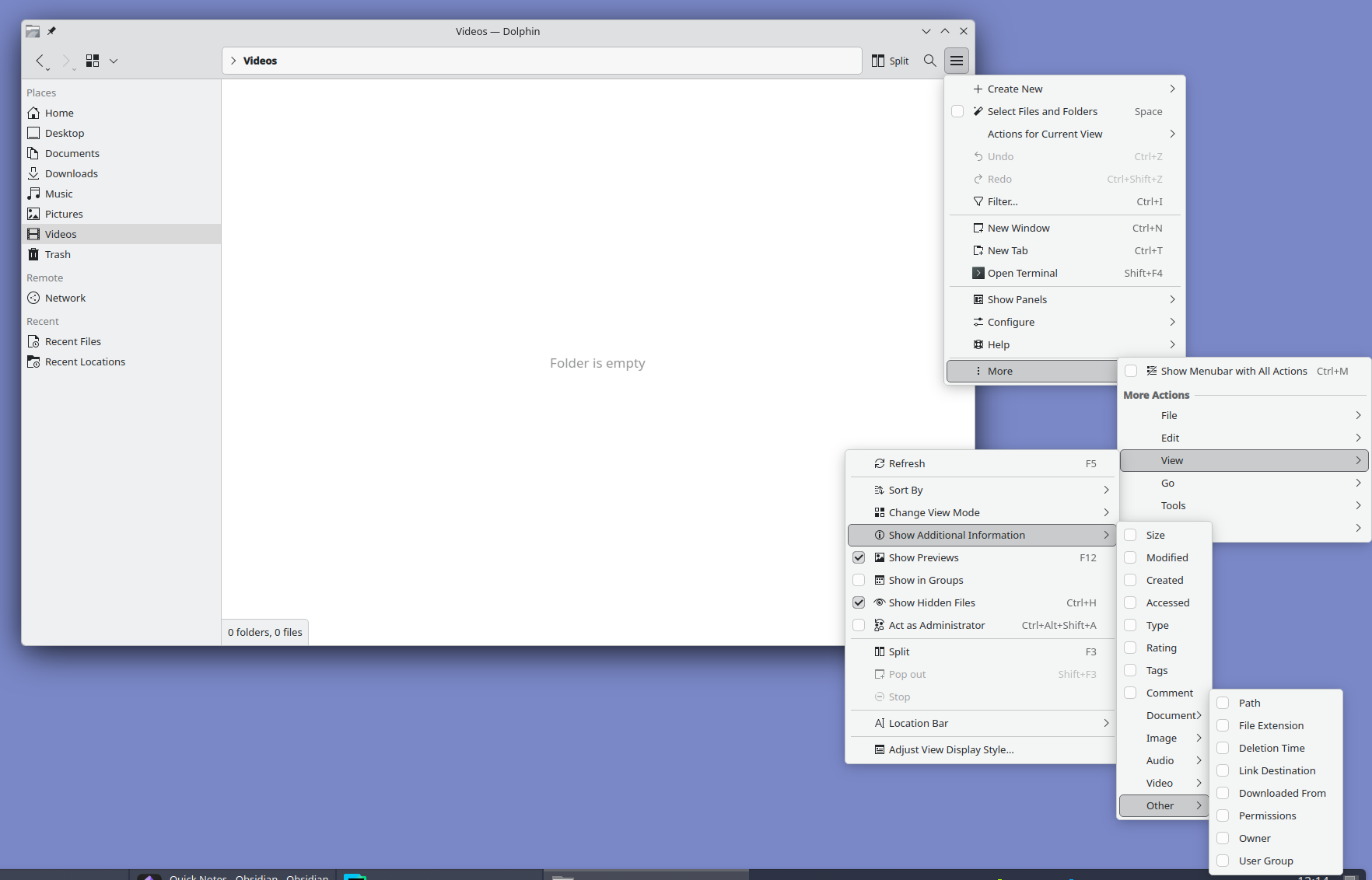
Look at it and tell me this is normal. I love Plasma but oh man do they need to hire a real designer. Someone with balls to unfuck the interface and move all advanced settings out of GUI into a well documented config file.
That seems a bit contrived to me. Okay, that particular place is pretty deeply nested, but it's clearly a regular menu tucked away in there, with a option to show the menu bar. If you turn that on, then those options are half as deep. Or if you don't need to adjust those options, you don't go that deep.
The sibling comment, meanwhile, is complaining about extra space devoted to explicit controls for all of the extra options. Well, you can't have it both ways. If you want to have a lot of features and options, you have to either devote some space in the main UI to them, or have a lot of deeply nested menus like that.
Or I guess you could do a config file somewhere, but IMO that's even worse. If we're going to complain about bad UIs, isn't it even worse than some deeply nested menus to need to open a separate file somewhere else with a separate program and learn whatever config file syntax they happen to use.
While I prefer deeply nested menus (and I acknowledge I'm a weirdo at that) there's plasma-manager if you happen to use Nix and home-manager. I don't know if it will help in that specific case but if you'd rather have the config in a well documented file this could generally help.
Nothing wrong with nested menus. The problem is that plasma has a classic File menu inside of a hamburger menu hidden under a "More" button with a whole set of duplicated options that can be found in other parts of the interface. It's nuts.
I'd rather have all that mess removed and settings 1% of the user base "needs" moved to a config file. I don't want to add an another layer of complexity with external configuration tools.
Konsole on left, ghostty (which is gtk) on right. The latter has at least 3 additional lines visible outputting the same command. The giant copy paste buttons, tab bar which wastes a ton of space, are typical of kde apps. The klutter isn’t just visually annoying it makes the apps less useful.
Honestly this is the only complaint I agree with. KDE plasma desktop and its configurability looks and feels great... but all their in house actual windowed applications like Konsole and Kate are mediocre at best. All that duplicated effort seems wasteful.
I wonder how much QT has to do with this. AFAIK the only _decent_ bindings are still C++ and Python. For KDE it might just be C++?
There's plenty of valid criticism of GTK but choosing C over C++ isn't one of them. It seems like there is a new Rust GTK app every week, and other languages as well, thanks to the availability of bindings.
I'm curious how long relying on C++ contributions is going to last.
It's honestly just Konsole. Kate is very good, you can legitimately use it as a vscode replacement if you want. Dolphin is also the best file manager and it's not even close.
No alignment issues, menus sorted by professional designers, easier to learn UX like ribbon menus and a lot more.
Feel like the design issues stem from it being shaped by existing power users. Familiarity tend to downplay design issues so stability took priority, even though the UX never should've been stabilised in the first place.
I recently installed Fedora with KDE Plasma on a new computer and I can't say I feel the same way. The UI is still clunky (eg the file explorer is clunky) and I'm running into minor bugs pretty regularly. Windows will be sized incorrectly after a restore sometimes (failing to take into account the bar I added at the top), switching between multiple windows of the same program and a separate program seems non-deterministic, random UI components occasionally crash and restart.
I don't want to be negative for the sake of it but I constantly read these really positive comments about Linux on the desktop (in general or in specifics) and it gave me a false impression of what to expect. Not the first time I've fallen for this either over the years.
It's rare to see a perfectly stable desktop UI in general. Even on my Mac and iPhone minor bugs are almost a daily occurrence.
But KDE especially is a combination of huge scope and limited resources, whenever I used it there was always something obviously unpolished.
How is it on older or budget hardware though? It’s been a long time since I tried KDE, and in between even worked with Xfce because Gnome was a bit more resource intensive. Is it still the case that in terms of hardware specs and demand of the hardware, KDE needs/uses more than Gnome? I guess Xfce will be in a different league capability wise and resource requirement wise.
AIUI, they actually really made an effort to improve on that front, to the point that KDE is actually really good about resource use these days, which is eg. why it was picked as the default for the pinetab 2.
I use LXDE on my new boxes, but on a 15 year old machine I wasn't sure what the Linux distro had defaulted to. I was surprised to see it was KDE. That machine takes 30 sec to decrypt the disk encryption key (stupid proof of work functions!), but the desktop environment is as snappy as LXDE on high-end 2026 machines.
I haven't compared those two with XFCE recently, but they all seem fine these days.
I run it on my RK3588 based MNT Pocket Reform. I have to force the GL ES 2 backend because of, presumably, Panfrost bugs, but otherwise it runs well despite the fairly weak CPU and GPU.
I did, but I don't share the sentiment. Moved this year from macOS and KDE is over-engineered with little thought put into the UX. For example, try to take a screenshot. I was quite literally shaking my head for good couple minutes looking at this abomination. It's so extremely confusing, all over the place, bogged down with tons of switches, modes, it's like you need to spend 30 minutes to understand how this thing works and all the Whys. Took me couple days to realize it was an actual Photo app in its screenshot mode. If only they spent some of their increasing budget on some proper UX usability testing and not rely on their people's gut feelings and a "that'll do" mentality...
Meanwhile, Gnome just works exactly like you'd expect it to. I said it before already, but Gnome is for people moving from macOS and KDE is for ex-Windows veterans.
And, for the record, I don't want to praise Gnome's overly-minimalistic approach, either, which too gets annoying when you have to find an extension for every stupid extra setting beyond the defaults. But, all in all, I much prefer it over KDE and wouldn't switch back. Not to mention the aesthetics, because there's no comparison if one shares the Apple/Braun ideals on design.
A plot twist here is that I am also a KDE app developer...
Spectacle used to just let you automatically save with no confirmation dialog, then they changed that a year or so ago. Maybe it's still possible to configure it but I was less than happy to have my default changed.
What Photo app are you referring to? On Debian Trixie, I just get the screenshot app, Spectacle. It shows the screenshot it just took, tells me where it’s been saved, lets me do stuff with it, and lets me take another one. It could do with a facelift, but it’s fairly clear, really. I wonder if they changed it later or if the distribution you used deviated from the defaults.
I believe they changed the app since Trixie was released (Trixie has KDE 6.3, the changes were in 6.4) and buried a lot of the really common settings behind menus. E.g. you might want to take a screenshot on a delay, and that's now hidden behind a menu whereas they used to surface the most common features on a panel.
I'm on Debian bookworm, and a screenshot is one Meta-Shift-S -- I just highlight the region I want to capture, and I get a dialog prompting me to (with one click) copy to clipboard, save to file, or annotate. There's a handful of out-of-the-way options as well, depending on what exactly you want to do. What's --- so abominable about that?
I would be very annoyed if every screenshot I took was saved. I often take dozens of screenshots per day, and I save one maybe once a month. That means my screenshots folder only has meaningful entries. If everything was saved, I'd have to clean it up all the time.
There might be a small misunderstanding regarding the "dialog". Once you've selected an area you're shown the outlines & can still modify them, and the buttons (Accept (for further editing in Spectacle), Save, Save As, Copy, Export) are shown below those outlines.
This approach seems objectively superior to your suggestion.
> If anything, that's not a typical user user case by far.
The scale may not be typical, but the pattern (many more screenshots copied to clipboard than saved as a file) is something I see across all kinds of users around me, be they technical or even very much non-technical.
Let's not turn the defaults into "The Homer", okay? Allowing the user to choose their preferred action in the same step as allowing them to change the outline doesn't make things unnecessarily confusing, doesn't add unnecessary clicks, or anything else.
The meaningful entries get named for later searching while the rest are kept as my computer's little photo journal or something. Comes in handy a few times a year.
It does. If you paste (to slack, email, whatever) after taking a screenshot on Gnome, you will attach your screenshot. It is also saved on ~/Pictures/Screenshots.
If Gnome made their screenshot feature an app then it would be possible to just use it on any other desktop too, as is usually a strength of Linux. And it would then also be possible to add it to Gnome's dock, which wasn't doable last time I checked.
I don't get how this can lead to confusion. You can hit PrintScr, draw a rectangle and hit save, or enter "screenshot" into the bottom left menu, rectangle, save.
There you can also see the common options with shortcuts for "Full Screen" etc, at least on openSUSE Tumbleweed. I would assume that is the default behaviour.
The nice thing about Linux is that there’s a DE or WM for everyone. Personally I can’t imagine running a whole desktop environment when all I want is to draw some windows and a status bar. But, to each their own!
What are you talking about, spectacle is everything I want in a screenshot tool and I do not want it to be any other way. If you want something that just takes a picture then you might as well go back to 2012.
Except that's exactly my point. You come to that DE, you don't want to modify and optimize every single nook and cranny. I mean sure, some do, but this is a vast minority. If Linux is to become truly popular desktop, it needs DEs like Gnome, aiming at those who are just fine with all the defaults curated for them.
That's just reduction to absurd. I clearly meant their approach to UX and usability. Are you gonna argue only one DE in Linux is to take serious approach to it?
Yeah, and more DEs like GNOME will just take devs away from GNOME, and GNOME will regress. There aren't tons of avilable open-source devs who have the skill necessary to create a DE.
There's a lot of "we need this" "we need that" in the open-source world. But when you look at all the limitations objectively, we've already reached the highest point we can achieve.
Or system tray icons or application menus. I have used GNOME since forever, but it became barely usable. You can bring back most functionality with extensions, but they are very buggy.
What you're talking here is what I mentioned: Gnome maybe goes too far with removing some functionality, but I personally haven't used desktop icons in like 10 years and, based on current macOS trend, neither does Apple bet on it. But I am talking about overcluttering and overcomplicating UX, not oversimplifying it. Both things can be true and my KDE complaints are about the former, because I was responding to someone else praising it.
I think you are correct to state that KDE can still improve in a lot of ways. Although I personally find the new screenshot tools to be great: I now use them a lot more than I used to, especially to annotate things.
I was responding to your belief that somehow Gnome is better or that "Gnome just works exactly like you'd expect it to," as you stated. My point is that it does not. And you might not find Desktop icons useful, but I (and millions of other people!) use them every day and have for decades. I could drag and drop icons on the desktop of my family's first computer, a Mac that ran System 7 in the early 1990s. And then our Windows 95 box. And then Windows 98, and 2000, and XP, and a laptop that ran Vista. And then that laptop running Ubuntu with Gnome 2, and then Ubuntu Unity, and then Gnome 3... until Gnome decided, nope, sorry!
So you chose the outstanding screenshot utility to highlight the problems with KDE Plasma interface? Really? Why not something like this?: https://files.catbox.moe/uvxbea.png
I really like KDE plasma, it's the best DE out there once configured to mimick Gnome 2 / Mate, but I agree with you on screenshots! Also, Konsole required much configuration to be not way too busy.
I am absolutely certain they're headed in the right direction, but even some minimal Usability Testing would give them tremendous amount information on all the low-hanging fruit they could fix/optimize and substantially improve the on-boarding for newcomers.
Super cool, I have been extremely pleased with my switch to KDE. I have used MacOS as a daily, I have used Windows 95-Win10, I have used various linux distros all for long periods of time at work and home.
KDE Plasma has really hit the sweetspot for me, it's super usable daily and still has easy customisability. Thanks to all the effort poured into Proton I have even replaced my gaming PC with Arch/KDE plasma with really very little stress.
I am VR gaming, on linux, on AAA titles, with no messing around, if this isn't the year of linux desktop then it will never be.
I just scale my regular desktop to 133 or 150% when I plug my laptop to my video projector and use that old cordless keyboard/trackpad combo from microsoft or logitech (can't remember and can't verify right now, thise with a usb receptor) I bought 2 decades ago.
I don't really think a specific TV like interface would make it more user friendly really. It is much faster to browse and select files than on any remote based interface I have ever used on dedicated devices (or video game consoles). Turns out we have never made any better device than a keyboard to type search words :-)
I could use kdeconnect to control a lot of stuff like volume / play/pause / next buttons from my smartphone but I don't even do that as the keyboard+trackpad combo is always available next to me anyway.
My suggestion would be an airmouse remote, possibly with an built-in keyboard. This is because sooner or later you will want to use a web browser to stream content, and a mouse is incredibly convenient for that.
There are many bluetooth remotes you can use for this. You may want one that has a built-in keyboard, or just one with arrows and a handful of buttons.
This is really cool and I'd love to see TVs ship with it. There's a lack of innovation these days and I think the only way to bring it back is to recognize that computers are environments and people need to be able to build on them. With TVs becoming more powerful this could be a big win.
Make it easy so my aging tech illiterate parents can use it (looks like it does the job, at least as well as any other) but also hackable for people like us, to fix bugs and drive innovation.
My TV is currently a monitor for my computer, so something like this even works for me in the same way steam big picture does. For work, I ssh in. One thing that helps is I use ydotool and my phone and laptop can easily be a keyboard
I work in the refurb division of an e-waste recycling company. While I prefer XFCE in general, KDE works much better on touchscreens. I have a handful of old first gen Microsoft Surface Hubs sitting around. I wonder if this Bigscreen mode supports touch, if so it might be awesome on a 55" (or 84") touchscreen.
Since this is not going to be released any time soon, any suggestions on what could be used to be a TV UI for Jellyfin? It should just show that, nothing else. Currently I'm using a Nintendo Switch with Switchfin and it's pretty neat but sometimes even transcoded streams stutter or make the fan go brrrrr
This sounds awesome but reading the comments it sounds not quite there yet?
Right now I use an AppleTV with Kodi installed via developer account. Unfortunately, Kodi on AppleTV is not well supported so it crashes a ton. I'm not much of an Apple dev. After much gnashing of teeth I managed to get a from source build running so I could maybe look into why it crashes and contribute but I've never debugged an AppleTV app and even trying to switch to using the simulator which I suspect is better for debugging, I couldn't figure it out.
But, quite often I just wish to get some other small box for Kodi. Except I don't want 2 boxes, one for Kodi and one for other proprietary apps (Crunchyroll, Twitch, Netflix, ...)
Depends what you use Kodi for. If it’s for accessing media files on a network drive, Infuse is the “gold standard” media player for the AppleTV.
It’s not free, though. But it’s far more stable and nicer to use than Kodi ever was in my experience. I ran Kodi for my home theatre for years but switched to AppleTV+Infuse and never looked back.
For free (and open source!) options you can use the Swiftfin tvOS app and a Jellyfin media server.
If you have an Android box, you can set Kodi as the launcher (so the home button will always take you to Kodi home). It has a section that lists Android apps and lets you run them from there.
It's a bit backwards but I did it for years, and it works really well if you're ok with the Kodi experience.
Same set-up here. Had tried many times over something like 15 years to get Kodi/XBMC working well. Nobody else could/would ever use it (the UI is so bad) and I bet I spent about 50% as much time screwing around to set it up and maintain it as I ever spent watching stuff on it.
Jellyfin, at first with the official client on Roku then on Infuse on AppleTV when x265 hardware decoding started becoming a requirement (my server is too weak to transcode) has been everything I wanted Kodi to be. Web interface is great, I share it with a couple friends over Tailscale. Wife and kids and visitors use Infuse, no problem, no complaints, no help needed. My use-to-fiddling ratio is probably literally 100x better than with Kodi. I have spent overall less total time messing with it than with Kodi, even including figuring out solutions for things like YouTube videos.
I also moved from Kodi to Jellyfin. I have an ubuntu machine as the server and an Nvidia shield with Android connected to the TV as a client. Works great and was much simpler to keep working right than Kodi. Although Kodi didn't need any server side software except SMB shares.
Bigscreen is just basically a DE. To run Android apps on Linux you can use Waydroid. But yes, you can absolutely combine Bigscreen, Waydroid and a few other apps such as VacuumTube and Steam in fullscreen mode to create the ultimate free/libre streaming/gaming console.
This is just a DE for Linux, it does not solve the problem that DRM is incompatible with a free platform. Get your content from another source than Netflix.
I'm guessing because of a higher widevine certification level or a server-side policy?
You can also spoof Opera's user agent and get 1080p on FF so guessing it's a server-side thing; since Linux has L3 widevine certification because no kernel level TEE
I have no issues on Firefox FWIW. I haven't needed to spoof the user agent, though this is something I needed to back in the day when they literally blocked FF's user agent.
"Plasma" is an awkward name for a television app. First image that comes to mind is the old plasma 50-inch I used to have. Damn thing weighed nearly 100 pounds and was really power-hungry.
Bought it as an intern dirt cheap off of some dude at my company who posted it in a email group. He upgraded to the latest and greatest and just wanted it hauled out. Picture quality (for the time) was incredible!
It also doubled as the worlds best space heater. My god it was power hungry.
If you have regular KDE I urge you to just shake your mouse vigorously for ca. a minute. The cursor has this mouse finding feature where the mouse cursor gets bigger if you shake it. It can get comically big, like fill the whole screen big.
I can't for the life of me figure out if this is a way to put KDE on my TV by overwriting the existing OS, or if this is something to install on a computer which I then plug my TV into via HDMI.
I'm not being lazy here but I have reviewed this site and outbound links. And, I have reviewed the threads there.
I'm very interested in repurposing my LG Smart TV and have been hesitant about installing a software package on it.
If I brick the TV I'm fearful my kids will burn me at the stake.
I don't see a listed hardware matrix, but do see a link to enter into the matrix server and ask questions. I don't see packages or a repository to add.
I think llms generally produce quite a bit of slop content but I think they could be used to explain open source projects a bit better. This seems like an opportunity.
I could totally wrong, but my assumption is that you’d get a small dedicated box (mini PC) that has an display port/hdmi/lightning port and usb ports and plug that into your TV like you would an Apple TV.
A remote control with wifi would work pretty easily by being connected into usb port, just like a wireless mouse.
I wonder if you can then use Netflix and other streaming services? I have a Chromecast device and could probably just switch the HDMI to use that. I can use Netflix on my Linux laptop but I haven't tried Disney and I would very much doubt Apple+ would work on KDE.
For streaming, any mini-PC (e.g. N100 or a used thin client) paired with an airmouse remote (I use a Pepperjobs remote). If you want to use Steam on that machine and play modern games however, then you basically need a gaming PC and an Xbox controller.
The privacy angle is what stands out to me here. Most smart TV platforms are essentially surveillance devices with an entertainment UI bolted on. Having a fully open-source alternative that doesn't phone home with your viewing habits is a meaningful improvement, not just a technical curiosity. The CEC remote support is a nice practical touch too — one of the main friction points with HTPC setups has always been input methods.
If I had to guess, I would guess that this statement was put there before ChatGPT existed.
[edit]
Unless this text was buried deeper than the front page and then promoted, I was wrong. That language was not there last November according to archive.org
There's not, but it's also a very very old technology - definitely not 'modern' linux.
It has a lot of problems especially with protocol standartization and permissions. You can tell something and you might get something back or you might listen for something and get garbage instead.
This combined with a tv that had tactile buttons again would be nice! So tired of the buttonless TVs now, or the buttons that have no tactile feedback so you don't know what you are doing in the dark.
Like no tactile controls in cars, this was also a mistake for TVs
If enough people do this, and refuse to buy TVs that do not work without an Internet connection, manufacturers will get the message and not make such TVs.
Unpopular opinion, perhaps - isn't this just tech looking for a problem to solve?
The fact that the apps I would actually care about having on real estate on my front room seem to be nowhere to be seen is kinda glaring from my perspective... I know there's a certain purism to having Firefox front and center... But really?
I'd argue that that's orthogonal; this is making the general UI work well on a TV, then apps get populated into that. And honestly I'll bet that for most uses Firefox working well is what you want, since a handful of shortcuts to open Firefox to assorted streaming services would do the trick quite nicely.
I immediately envisioned having my feed reader as a FireFox shortcut and being able to navigate to YouTube videos from that.
Another thing is that I've found certain old movies can only be streamed from weird websites - as in https://weirdstreamingwebsite is the only licensed entity to have it. I could either buy a VHS (which is what we did) or stream it. But since a physical copy might not be available, the only option would be to use that weird website to stream it. There is no app!
Does anyone know whether Nate's donation-daemon is disabled on this device, by default? Because if it is, then this invites to a critical follow-up question: aka WHY is it disabled there, but not by default elsewhere for regular users of KDE. Nate, via his biased blog entries, constantly tries to reason how vital it is to pressure people (sorry; "voluntarily remind them that donations are acceptable for the KDE devs") into donating to KDE (e. g. his self-promo "what a success story I just did, we made millions!"), so if it is disabled on the TV device, it actually means that regular desktop users are a second-class citizen to him. KDE really took a strange turn ever since Nate took control of the project. Personally I much prefer the oldschool KDE approach; now suddenly we have "systemd is the only future" and other oddities way aside from the pester-Robin-Hood-daemon demanding more of your moneyz ...
For the sake of long term success of the KDE project - it needs a major public financial, secuirity, and bug audit. It would be worth seeing if the KDE project would use donation money to cover outside firms to audit their operations and code.
They made 467,889 euros in donations in 2024. This is the desktop environment that is an incumbent to taking market share from Windows. Is your comment serious?
I've got Windows 7 at 125% running on a 70some inch TV off a tiny Optiplex Micro with an i3 or something, and a fork of modern Firefox for w7, hardware accel and all. I use my phone as a bluetooth touchpad/keyboard with an app that was maybe 5 bucks. Best 10-foot interface I've ever used. Everything works exactly as expected, no fuss, no gotchas, no friction, no workflow-breaking updates. And I never lose the remote!
This (plasma-bigscreen) is going to fail, as 10-foot interfaces historically do. It is a waste of good developer time and focus.
Free Desktop people keep obsessing over ill-advised moonshots as a form of escapism; no one wants to address the fundamentally broken core desktop model. Papercut bugs are boring and solving them is thankless. Working on a shiny new TV mode interface looks better on a resume. Meanwhile the rest of the world is pulling their hair out over Windows 11 and macOS Tahoe because there are still no feasible alternatives for normal human beings.


reply