I just had a conversation about this last friday with a coworker. We both basically came to the conclusion that the only e-books that work are prose-oriented, not learning-oriented.
With your average novel, you only read from beginning to end, and you only read words. With a textbook, you not only read words, but you read diagrams and figures. You also skip around...you follow footnotes, references, and you also might follow a curricula that was not defined by the author. You will often refer to two or three different hotspots while studying a single chapter...for example, while working on practice problems, you will flip back and forth between the practice problems, the chapter intro, the context for that problem, and possibly a chapter recap.
This user-adoption gap is not one of the underlying medium, but rather of the user interface. Flipping pages one at a time is not sufficient.
There are tons of text features that suck or are absent in ebooks. Even footnotes aren't great, let alone things like facing-page translation—or anything else that relies on two pages being visible side by side at once, which is quite a bit if you're reading much outside of mass-market fiction. Plus, yeah, diagrams, figures, et c.
Poetry often blows in ebook form. A good paper book of poetry has a lot of care put in to precise placement of the text, and it can add a lot to the experience. Ebooks can't do that. Really, any book that benefits from fixed page boundaries has similar problems.
Even one of ebooks' big advantages, full-text search, is worse than using an index unless either 1) you need to search for something that's not in the index, or 2) you're on a device with a full, real keyboard, so not a tablet or eink device.
Ebooks are also very expensive and there's no used market—I'd effectively have to pay ~3x what I did to assemble my physical book collection to replace it with ebooks, provided there were an ebook version for all my dead-trees (not the case). It'd be even worse if most of my books were common paperbacks (the thing ebooks are best at replacing) since you can pick those up for next to nothing if you keep an eye out. 10x the cost to take such a collection digital, I'd imagine.
OneNote on my Surface Pro is about the best thing I've found, and yet it still has major flaws (this is without even getting into how bad its pdf import is). Capacitive touch + active-digitizer stylus can solve a lot of the problems with ebooks (and indeed does, particularly as far as annotation is concerned), but the software is still severely lacking.
The main UX challenge that I haven't found anything has really solved yet is the ability to show 2 or more pages at once (and do so in a way that's simple & intuitive). Also related is some way to mimic the ability to, with a textbook, stick a pen or finger in between two pages as a "temporary bookmark", to make it easy to flip back & forth.
Now that the hardware has caught up to where it needs to be, I think e-textbooks have the potential to get a lot better as software improves. I don't think the physical book will ever die, but I do suspect that ebooks will be much more prevalent in 10 years than they are now, when the software has finally solved UX challenges like these.
>The main UX challenge that I haven't found anything has really solved yet is the ability to show 2 or more pages at once (and do so in a way that's simple & intuitive). Also related is some way to mimic the ability to, with a textbook, stick a pen or finger in between two pages as a "temporary bookmark", to make it easy to flip back & forth.
Maybe a spot on the screen or a button on the side you can press to bounce to some "reference" bookmark, letting you navigate there normally until you release it, at which point you instantly return to the page you were reading.
Depends on a) the quality of the e-book adaptation's typesetting and markup, and b) the size and quality of the device. The textbook publisher needs to invest a little (though possibly not as much as conventional typesetting) and the student needs to shell out on a full 10-inch screen (which need to be used on several books for the investment to amortize out correctly).
Layout/markup: for well-done academic volumes (using Google Play and Sugimoto's "An Introduction to Japanese Society" as my reference piece) things like footnotes are actually a better experience than print - you tap a blue-highlighted superscript, and you get a model that pops up inline for you to read and then swipe away. No looking up the number at the bottom or (even worse) in the endnotes. Tables are all linkable and back buttons work, etc. On the other hand, a straight import of the original text and graphics without any semantic markup can be truly painful to use.
Device quality: this matters more for things like academic volumes with charts/figures (as you mentioned) and graphic novels. If you have content that needs to be viewed on a single screen, and it's organized to fit on 10-inch-diagonal paper page (or larger), it's going to suffer a lot on a 7 inch tablet. especially on small form factors. If you try to read a book with tables and charts built for a full-size hardcover on a 7-inch tablet, it will go badly (I have tried this). On a ten-inch tablet with a screen closer to the hardcover size it's actually quite pleasant.
These two issues interact a bit with the layout/markup issue; for example, I've seen linguistics books that try to give the same text in three versions (foreign language, individual-word translation, and idiomatic translation) as three-line clusters, like so:
    mah     nishma`?
    what    hear.PASS
    How are you doing?
The typesetter didn't know how to make these reflow correctly using e-book markup (which may not be possible given the tools available?), which means that the line breaks are hardcoded, and the ends of long lines will be unviewable past the edge of the screen on 7-inch tablets. On a 10-inch tablet this works quite well.
Doing the things college students do with textbooks (flipping back and forth between a pset and the material, for example) requires a bit of familiarity with the software but it's very doable and I think very pleasant once you get used to it. It is a barrier to entry, though, and I think e-book UIs need to make it easier to learn. This might just be my personal experience, but I find full-text search, even with a tablet screen, much faster than index lookup in print.
> Sure ebooks can have precise text placement, just use a PDF.
Not so hot on most e-ink devices, but yeah, you can use a print format to achieve print-like documents that throw the middle finger at your screen's dimensions/resolution with sometimes-nice results.
> As for indexed vs full text search, an eBook can have both, and many do.
Ah, but their indices are usually more of a pain to use than an index in a real book. Like footnotes, but even worse. As with full text search, though, it might beat the dead-tree if you're on a laptop/desktop (bigger screen that can show the index to the side of the text) but at that point there's not much distinction between an "ebook" and anything else one might read on a computer.
> No argument on the price, though it didn't hold for works out of copyright.
Unless they're not originally written in a language you can read, in which case odds are good that the best translation is still under copyright. In fact, it's not uncommon for there to be several copyright-protected translations all of which are better than any of the public domain ones. So technically, yes, you can go to PG and grab a ton of classics for free. Practically speaking, for non-[language(s) you can read] works, if it's worth putting in the time to read it you'll be well served by buying (or borrowing) a newer translation. All those 19th century ones have a way of being both less accurate and less pleasant for a modern reader.
I'd love to see House of Leaves as an ebook. Even a PDF has limits, as do e reader screen sizes. If anyone makes that book work as well as paper, I'll consider ereaders a solved problem.
That seems abundantly obvious to me. I've been a fairly avid fan of Kindles for about 4 years, but I've never even considered reading a textbook, programming book, or reference book in that format. All I have ever read on my Kindles are novels, comedy, popular science, and biographies, all of which are very prose-oriented and linear. One pop econ book I read recently had a lot of endnotes, which was admittedly a bit annoying, but I don't think it would be significantly less annoying than a physical book with a lot of endnotes. Luckily the endnotes were not very crucial to the text.
I have purchased several physical books from Amazon and chuckled seeing them offered for Kindle. The most recent examples were a large and dense musical theory book that's very reference-oriented and has a lot of diagrams, and a book of Bay Area hiking spots that is obviously very map-oriented and meant to be thumbed through. I can't imagine using either on an e-reader.
I wish I knew more details about what sorts of material they were having these young people read, but I suspect it was largely not prose-oriented.
> We both basically came to the conclusion that the only e-books that work are prose-oriented, not learning-oriented.
Completely agreed. E-books are great for linear text, but the moment you have any kind of cross-referencing it falls apart (even footnotes are troublesome; why can't footnotes be display inline?) Most importantly, they lack discovery; it's a lot harder to flip to a random page.
That said, I have started reading a programming Apple iBooks textbook [1] and I find the format great because it's interactive and because [edit: in principle...] you can copy and paste code snippets directly. In this sense, I think it's actually a lot better than its paper counterpart–but perhaps coding books are a niche (and, I'm sure, some would argue that having to re-type code yourself is a worthwhile exercise in its own right).
I do need to try an iBook, but I think good old fashioned web pages work great for reference material [1], especially if you can combine it with something like Diigo [2] for note-taking. Can't beat the book-markability and searchability of the web. What I wonder is if something like a Surface Pro is good enough for pen-written notes, because if I were in school again I'd probably just use that for everything.
I agree, if by "eBook" we mean only the specific formats (ePub, PDF, mobi). But I'd argue that you can have all if you make a website instead, and read it on a browser. You can then have multiple tabs, bookmarks, large pages with fast scrolling, etc.
And an epub is just a collection of HTML files anyway, so it shouldn't be difficult to make a website instead. I think what's missing is a "website archive format" supported by all major browsers, so the user can have an offline copy of the "book".
> And an epub is just a collection of HTML files anyway, so it shouldn't be difficult to make a website instead. I think what's missing is a "website archive format" supported by all major browsers, so the user can have an offline copy of the "book".
Seems to me that, since an ePub is just a collection of HTML files (well, there's more than that -- there's also an index file, at least, IIRC), the solution is that browsers should be enhanced to read ePub directly. You've already got the "website archive format", you just lack the browser support.
> I just had a conversation about this last friday with a coworker. We both basically came to the conclusion that the only e-books that work are prose-oriented, not learning-oriented.
To me, this is precisely backwards.
I would LOVE to have all my technical library in e-book form where I could easily reference it on a tablet instead of the 4 bookshelves and 42 boxes that it sits in.
I never need my entertainment book on a tablet.
In addition, e-readers are still too slow for me. I can flip a page faster than anything renders. This is STUPID given the vast amounts of processing power we have but continues to hold true.
The only time paper books become easier to use than paper books for me is when the book makes extensive use of really fine print in tables or has extremely long lines of monospace text such as badly written source code.
The resolution of an iPad Mini 3 or iPad Air is sufficient to render all the technical books I use quite adequately.
eInk devices do not have the resolution and screen size required for comfortable technical reading. With "Retina" displays on a decent form factor, magic happens.
I use the iBooks reader almost exclusively since it has very good note-taking and place marking tools.
The only thing iBooks can't handle is position sensitive layout, such as some "art" books which rely on specific typography and layout for conceptual flow. PDF can handle some of this, but if the format is not exactly the same as the iPad screen we're back into "I can tell I'm reading a PDF on an iPad" territory rather than "I'm reading a book".
The Kindle is optimised for flowed text. Of course it is painful for technical books.
Came here to say about the same thing. For regular reading I don't care the medium but will pick ebook most of the time so that I have it everywhere I go and can read a chapter or two in the waiting room on my phone and pick up on my tablet later that night. For text books I have yet to see a good digital interface to them, mainly due to not being able to quickly jump between sections/pages. Maybe an interface where I can "cut" out parts of pages and organize them all on a digital corkboard is closer to what I imagine as "the best" way but still I'd pick book over ebook. The one other thing I will say is that I did get ebooks instead of textbooks a number of times in college because it was cheaper and I was told ahead of time that we either never or rarely use the book (but had to prove we got it or lose points in the class).
> The one other thing I will say is that I did get ebooks instead of textbooks a number of times in college because it was cheaper and I was told ahead of time that we either never or rarely use the book (but had to prove we got it or lose points in the class).
With a couple of books I reference often, I've bought the physical version after already having the e-book one. It really makes such a difference.
On the other hand, the convenience of looking for a book online, being able to choose one or a couple, and having it in your e-reader after a few minutes is also something not to discard.
Paper is waiting for ereader screens to increase in size and resolution and to grow a facing page.
I'm not sure if ereaders will get there in time, because laptops may overtake them. We'll see...
Either way ten years from now readers will be all-electronic slabs of foldable plastic, and won't look so much like the limited single page Minimum Viable Product designs that are popular today.
The limiting factors for textbook content are commercial, and will probably be bypassed. Academic papers are already moving to open distribution, and I'd expect a GitHub-for-Textbooks with wiki-able content to appear within the next few years.
Publishers don't have the time, insight, or interest to enhance textbook content. If enhanced content is open-sourced the work can be spread across an entire population, which makes it much more viable economically.
The only catch is how this works financially for authors. About that, I have no idea.
I have to ask: how much of this do you think is because of the digital format, vs how much of it is because the digital format doesn't support certain physical book methods we use?
The two that come to mind are post-it notes and flipping through the book. If, perhaps, I could press and hold my finger one end of a tablet to flip through it, maybe it would make them more suitable. Also, perhaps if bookmarks I made in the book were always visible at the top of the reader, it would also make it more suitable.
It might even be useful to make the application present a 3d view of a real book based upon the orientation of the device. That way I could angle it to find roughly how deep within the book a bookmark is.
How about on a tablet? I admit, I don't really like reading a screen (I do love me some e-ink for novels, though). I've found for things that require flipping back and forth (think DFW foot-notes) that an iPad Mini has an intuitive enough interface that I don't find it cumbersome. I think the real challenge is making the ebooks not just text, but interactive. That is, ebooks should add value to the text, not just reproduce it in a different format.
One could and should argue that reading and learning from webpages is an e-book. All the stuff you mentioned about skipping around, footnotes, following references, are all things that were solved with HTML. It's just that the current state of 'ebooks' have regressed and using their own formats.
So if they learn and read from websites then they are learning from ebooks. I think they would prefer to have the internet than to have paper books.
I agree -- the need to flip back and forth ruins ebook readers for technical material. There's a similar problem for writing notes on the page. They allow it, but clumsily.
But it seems like a solvable problem: there should be some brilliant user interface that makes it easy, it's just that no one has found it yet. And I'm not sure it's even possible on the classic Kindle (the epaper one), where each view update is clunky.
I guess I'm an outlier because I can't stand to read my academic stuff on paper. Just the ability to search for a specific word makes it so much easier than trying to figure out if something is in an index, if it might be in the index but using a different term, or any of a bunch of other reasons why indexes are not enough.
I don't know about you guys but my Kindle paper white shows footnotes in a pop-up dialog box. No page fumbling. I thought DFW's books were great on Kindle.
But yes, learning-oriented Ebooks I always read on my laptop. Nothing can compete with the power of cmnd/ctrl+F and multiple windows IMO.
I actually read IJ on a Kindle and found it significantly easier for the most part than reading it in print because of links to endnotes, which removed the requirement to keep two sets of bookmarks (if you haven't read it, some endnotes in IJ are a sentence are two, some are 40 pages). There were some occasional issues with going back to the main text (IIRC the back button's stack wasn't saved across sleep), but overall it was much better for me.
But no, I'd never read a textbook on a Kindle. Can't flip around.
I don't know if that style would even work for Infinite Jest. David Foster Wallace, the author, is known for his extensive use of frequent, long, multi-page, and often multi-level (footnotes having footnotes) notes.
I look at how Grantland has adjusted to using footnotes, since several of their writers (Bill Simmons, Chuck Klosterman) were influenced, in some part, by Wallace and utilize lots of footnotes, and think it's a decent experience on desktop, but not that great on mobile devices.
The Kindle can't do things like that. Also in the case of the book I mentioned some of the endnotes are dozens of pages long. Those won't fit in a little animated bubble. Some of the endnotes also have their own footnotes.
I feel the complete opposite for all of the college textbooks I've used (although all of my textbooks are filled with problems rather than readings).
Using a laptop or e-reader to read textbooks is awesome for a couple of reasons. First off, having multiple textbooks doesn't weigh anything, and I can carry them around at all times. Secondly, when doing assignments and the like, I can bookmark the answer section in the back, and flip back and forth between questions and answers arguably faster than I could with a paper book. Finally, the best part of electronic books is the ability to search through it. Every definition in the book is a Ctrl+F away.
So maybe reading books electronically isn't as great when you're doing a lot of actual reading, but in my experience using more math/science textbooks, electronic wins out every time.
I agree textbooks on a laptop are really great - no heavy books, and Ctrl+F works really well. I can't imagine they work very well on e-readers though - it seems like flipping through pages would be slow, and ctrl+f would be pretty difficult without a real keyboard.
Not exactly an e-reader, but I read my textbooks on a Nexus 7 most of the time. I use Moon+ Reader, and the search and bookmarking features are phenomenal.
When I am on a desktop or notebook computer, I use either Evince or Preview, depending on the platform I am using. I would say Moon+ provides an experience equal to that of Evince, and definitely better than Preview, at least for the purposes of being an ebook reader.
You need to have multiple copies open at the same time if you want to refer to different parts at the same time.
Ctrl+f is great, but you end up losing the part of the book you were at before you started searching. So basically I needed to have 4 copies open at a time. 3 for different parts of the book I needed to refer to and one for searching. This made the actual size of the text way too small on a laptop screen.
Some of the problems could probably be solved with bookmarking software, but then you have to remember where each bookmark is instead of glancing at it.
I've managed to accommodate the need for multiple pages open at once by having multiple windows with multiple tabs.
This works much better for me than paper books due to freeing up desk space and not requiring multiple purchases of a paper text.
I use OS X though, so I have a convenient graphical window switching tool which shows me all the windows of a particular app, rather than a list of window names. Perhaps the experience is different for Windows and Linux users?
On the iPad, I make extensive use of notes, bookmarks and different coloured highlights. In some cases I'll use e.g.: yellow for definitions, blue for examples, pink for caveats. In other cases I'll use yellow for topic A, pink for topic B, etc. Thus the always-visible index of notes gives me twice as much information!
You can't easily get the same utility out of a paper book.
IIRC Firefox's built-in PDF viewer has decent integration with the browser back button, so you can search for text, read it, then press the back button on your mouse (or two-finger-swipe if you like making things complicated ;-)) to return to your previous page.
Not necessarily. I use the PDF-reader on OSX called Skim and it lets me bookmark the current page I'm on. Then I can just keep clicking the bookmark menu item and switching to the page I need. Only one copy. Each bookmark can have a label. Not too bad.
I also use Skim, it works really well. A pretty cool feature is the back and forward buttons, that hold your page if you skip through large chunks. For example, if I use the table of contents (Cmd + Shift + T) to go to the answers section, I can press back to get back to the question I was on. Then forward brings me to the answers once again.
That's basically my textbook workflow 90% of the time.
Potentially even more useful is the split view. Unfortunately, it only does horizontal splits, and only two at a time. I need to search again sometime for a reader with vertical splits, as horizontal splits are mostly useless on a little 11" screen.
So true about math/science books. I think they work for a lot of fiction reading too, you just have to set adaptive brightness or change to a darker background to avoid strain.
I think the biggest problem is we are getting e-books that are just digital representations of physical books. I'm learning music theory right now and it would be great if the book I'm following was an app with animated examples to re-enforce the concepts.
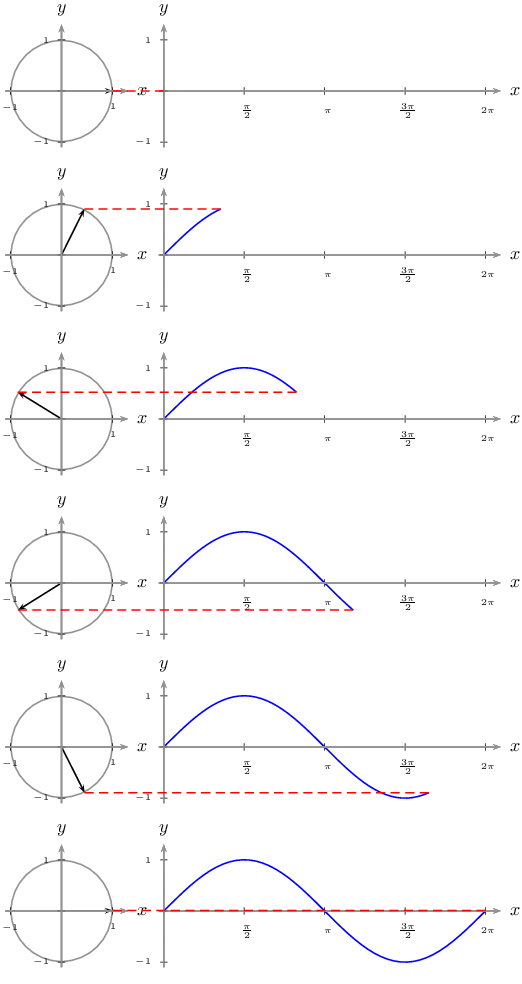
I'm also imagining the time I first saw the animated unit circle gif (years after trig class):
If that was in my "e-textbook", I think some concepts would be easier to explain. I think we are sitting at just the cusp of what "e-books" in school should be. They shouldn't just be for words, but for conceptual learning in a school setting.
You seem to be describing web pages. In ~20 years they've had little success in replacing textbooks.
Since they're so obviously superior for that purpose, I can only assume it's because there's not enough money in it for one reason or another.
Seems like some sort of free multimedia web textbooks resource would be a great way to spend public money helping some of those unemployed/underemployed professional scholars and scientists that are often covered on HN. Shouldn't even cost much, as government education expenditures go.
> "In ~20 years they've had little success in replacing textbooks."
I'd argue they have, just not in an official capacity. Even when I was in high school (early 2000s) we relied on websites (and diagrams like above) more than we did our physical books, which were largely not useful for learning.
The learners have embraced the power of multimedia and the web, I suppose the problem is that "I made website that makes it easier to learn" is not a photo-op moment like "look at us holding this iPad!".
My biggest irritation with using web pages for school is that with schoolwork, I am often looking down at my desk with paper and pencil in front of me. Using a website requires me to look up and deal with a keyboard taking all my desk space. It is hard to focus on the work when you are fighting with a computer at the same time.
I think the problem is that education has a deeply embedded tradition of disciplined austerity. I grew up with plenty of "fun interactive multimedia education" but the people commissioned to make that stuff are frumpy and boring as hell and probably hate their jobs.
By comparison, very few people who upload educational videos to YouTube do it because they were told to. It's something they're passionate about. All the best teachers I had made heavy use of YouTube in the classroom.
I agree with this. And as an author and teacher, I really want to use iBooks Author for that reason, but it's incredibly limited in both what it allows and who can use the books. There's an opportunity for an authoring tool for these kinds of books where media can be easily managed, and interactivity can be easily integrated.
ePub has some potential, but again, the e-readers handle it poorly in my experience.
What options and tools are out there to solve this problem? I've looked at SCORM, I've hacked some web page stuff together, but those all seem to require you to sit in front of an actual computer, not in a self-contained book format. Some friends of mine have done amazing things with iBooks Author, but the reach is very narrow from what I can tell.
Which book are you reading, out of curiosity? I recently bought Harmonic Experience, the physical book, and thought it was funny that it is even offered in the Kindle format.
(By the way, it's not at all an introductory or comprehensive music theory book. It's about the history of harmony, temperament systems, and psychoacoustics.)
I wanted to put in a plug for Open Music Theory [1], for anybody who's interested. It's an open-source [2], Creative-Commons licensed music theory text designed for use in college music theory classrooms. It's written primarily by some friends of mine, all with teaching positions and Theory PhDs, so the material is good. I'm using the 20th-century materials in my class this semester instead of assigning a $100+ textbook. It's not quite as comprehensive as a dead-tree book (yet?), but is a great resource for beginners, or people looking to supplement their knowledge.
which was chosen because I hoped that the "angle" would be useful for me as a DJ who needs to start making some remixes to go to the "next level". I'm about 4 chapters in so far and I'm pretty happy. I've also been supplementing it with Tenuto, Theory and Fiddlewax Blue (All iOS apps). I plan on getting FiddleWax Pro soon as it seems really fun.
That's interesting. I don't listen to any electronic music so I've never contemplated music theory from that angle. I'm also not aware of any music theory apps other than EarWizard [0], which does relative pitch training. I'll have to check out the ones you mentioned.
"In the United States, e-books are less expensive. Students will say, “I’d like to have the print version, but the electronic version is so much less expensive.” But if you buy a book used, the publisher and the author are not getting any money but they are getting another reader and they’re not cutting another tree. And the cost is less. And if it goes to a third generation the cost is really less."
That's a nice sentiment but there were a bunch of books in college that purposely changed portions from year to year to kill to resale market. Some profs were cool and researched what sections/questions would be so that you could use one of the 3 editions available but others didn't care.
I was happy to get all some of my books in digital form in grad school. Preparing for finals was so much easier.
'they say they get distracted, pulled away to other things.'
This is probably the biggest draw away from e-readers for me and the reason I gave up on them.
For prose, Amazon's Kindle achieved the right form factor, battery life, display combo many iterations ago for me; but I seemingly can't handle having so much information available with a button press. It's just too little effort.
It's one of those oddities of being human, I feel. It seems perfectly possible in theory to learn about a complex field fairly rapidly by simply using Wikipedia and Google, but in practice the discipline required to not wander off-topic I find impossible to manage.
The sort of semi-procrastination that occurs when you're still being productive (because you're still learning), but you realise that you've gone from studying waveforms to ventricular fibrillation.
The thing that's so strange about it to me is that books themselves are alien concepts, there's nothing inherent about them - humans chugged along for millenia without them. Yet somehow, clicking off of an e-book for 'just a few seconds' to look something up seems to function differently to, say, closing one book and opening another.
I've also seemingly paradoxically found that scarcity seems to have a dramatic effect on this.
Immersion, the sense of losing hours to a good book (or a good movie, or video game, etcetera) I seem to find more difficult as availability increases. There's a constant nagging feeling that I could be making better use of that time, that perhaps the next book on Gutenberg would be 'better' (whatever that means).
It's very difficult to really pin down why that is. If I were fantastically wealthy and could buy books by the truckload without even thinking about it, would I feel detached from them all in the same way?
We need a comparison of print, pdf and epub. PDF can retain print layout and typography, which makes a big difference in aesthetics. EPUB still needs work from device makers, to honor embedded fonts.
When the flexible eink screen from the 13" Sony Digital Paper goes mainstream with a bluetooth keyboard and Android clones, students can have access to a large yet lightweight device for reading PDF+epub, handwritten annotations and typed notes.
That looks Pretty Cool(tm) for dorks, but what's the real advantage over an actual piece of paper? Other than infinite content-to-weight ratio I don't really see the justification for the price tag. It's inconvenient, much heavier than single piece of paper or small magazines, journals, and printed out papers, needs a special pencil, requires charging.
I used to think that something like a Kindle DX would be amazing for reading datasheets while I design circuits, but in reality I need to draw the circuit and read multiple datasheets at the same time. One of these gizmos can't do that. Printing can do that, and at a tiny fraction of the price.
No device can compete with the usability of paper. Devices can compete with libraries.
Letter size e-ink pdf readers have long battery life (weeks), no eye strain due to page refresh, security/privacy of cloud-free offline SD card storage, fonts & diagrams in their original layouts, with handwriting annotation that exercises motor memory. The Sony device weighs 20% less than an iPad Air 2 while providing 60% more screen space.
For anyone who travels and needs access to a changing subset of a large document corpus, there are few alternatives. The excessively high price on the Sony device is reportedly due to an exclusivity period (less than a year), because Sony funded research for the new screen. Hopefully cheaper competitors will appear soon. Even at the $1K price, the Sony device is selling far beyond their expectations, into business markets, so they are now selling it direct online.
I travel a lot around the world, so I digitalized my entire library, University notes, everything...
I used a Fujitsu ScanSnap(amazing scanner with automatic feeder) to digitalized them using a Wood saw to cut the back of the books. I stored them in boxes in a locker room.
I love it because I control it. I could analyze my documents, I could index them, I could organize them as I want. I could mark them too on my tablet.
Much better than paper.
But most people can't do it(each of my kids going with a USD400 device to school sounds ridiculous to me). A tablet is expensive just for reading, and more expensive if you are going to add an active pen, like I use.
What is quite shocking is that the device I use the most for reading is a new 55 inches LG OLED screen, rotated 90 degrees. I use software that converts black over white "paper" to green on black.
Einks are slow, very bad resolution, monocrome(exchanging resolutions for tones using halftoning), and very small screen.
If only Qualcomm Mirasol or other technologies were cheaper it will be totally different. Not ready yet for the mass market.
> What is quite shocking is that the device I use the most for reading is a new 55 inches LG OLED screen, rotated 90 degrees.
Is that because you prefer to focus at a longer distance?
> I love it because I control it. I could analyze my documents, I could index them, I could organize them as I want. I could mark them too on my tablet.
Do you store them as PDFs? What software do you use for indexing/ocr?
>found a near-universal preference for print, especially for serious reading
Is this really any surprise for "serious reading"? Reading a textbook, especially one with lots of graphs, charts, figures, etc., is miserable on an e-reader. I suppose I always assumed that pleasure reading was the most popular use case for an e-reader. Maybe I'm way off.
EDIT: while muddling through this in my brain, I realized that I've been mentally defining e-readers as E-Ink readers.
This finding is not surprising and is a result of shortsightedness by technology companies, IMHO. They placed more importance in video games, multimedia than the simple readability of texts. First, they moved away from antiglare, matte screens. They favor flashy, shiny highly reflect displays, which show shiny videos and images very well, can are subpar compared to matte screens when reading in different lighting conditions. Second, they put less money in developing technologies similar to the Kindle readers, which prioritize reading.
I am sick and tired of reading reviews of devices based on their ability to watch videos and play games. I want to get things done. I want screens that do not reflect. I want screens on which I can read comfortably in different lighting situations. Give me those.
Well, yes, if you force people to use today's college ebooks. I made the mistake of buying ebooks a year ago. The ones I got forced me to use proprietary crap-ware that hardly worked, let alone worked the way I wanted. Eventually, I downloaded illegal PDF copies of the print versions of the books (that I legitimately paid for!) Using simple PDFs and an iPad was a dream come true. I can't imagine anything better for large, technical textbooks. Unfortunately, the legit offerings from text book companies don't even come close.
Honestly, I'm inclined to look sideways at this article. The college text book industry is just too entrenched and future-phobic for me not to believe that special interests funded these findings.
"They run out of battery, they hurt your eyes, they don’t work in the bath."
None of that is practically true.
The Kindle can run out of battery but lets face it it lasts weeks so you just need to remember to charge it occasionally. It is unlikely to die on you like a mobile phone.
I am not sure what they mean by hurt your eyes, but the ability to change the font size and still have convenient paging is brilliant. With a paper book you have to don your 2x non-prescription glasses I guess.
And they do work with the operator in the bath, and the eReader just above the surface. Just keep the window open so it isn't too steamy, and have a table ready for when you want to put the reader down (stop reading once your toes start to wrinkle!).
Oddly enough, my mother started having problems with eye strain with her Kindle a couple months back. She switched to a high DPI tablet and says it is easier for her. Rather odd since it goes against everything I think I know about eInk versus LCD, but the end user is always right!
I'm suprised that no one's mentioned this yet, but I've found that even for linear prose-text, my recall of what I've read is much better with paper books than with ebooks.
My working hypothesis for why this is true is that it's easily the mentally differentiate the paper books I've read: when I try to remember a book, often the first thing that comes up in my mind is the cover art. My mental records of paper books are indexed by a multitude of factors---what the cover looked like, what the paper felt like, approximate size, typeface, etc.---that just aren't there for ebooks
At first I was going to agree with this statement; however, I hate carrying all of my textbooks around, and if I have the e-book of the text that means I saved a lot of money. I do love reading paper books, you cannot replace the feeling of holding a paper book in your hands. It is something that I love about paper books. But I really do love the fact that I can have all 5 of my text books in one device that weighs less than any text book I am currently carrying around.
Last semester I had all E-Books and I was able to bring them all with me at work, and I was also able to read them while sitting in my work truck in the dark. This semester I do not have any E-Books and two of my text books are fairly large. Which really sucks, because I hate having a heavy back pack.
All around I do love having E-Books, on the Kindle I can slide back and forth to different sections, high light the pages and everything I do with paper books. I also take notes on paper as I go along with the E-Book, it really helps me to remember certain parts.
I am saying this at the beginning of the semester though, I might change where I stand but I currently love E-books, except when the battery runs out I hate the thing haha. Who wouldn't love to have 6 major textbooks on one device?
How do you deal with flipping back and forth pages?
For math classes specifically (realistically the only classes that I used a book for), I would frequently flip all around the book, where I was flipping too and from varied per chapter of course. Often times it would be 2 or so locations in the book that had all formula's listed (for the well organized math books!), the n and n-1 chapters text, the page with the current problem set that I was working on, and an answer key in the back of the book.
I guess I could set all of those up as bookmarks, but it'd be a real pain to have to keep adjusting bookmarks every day.
The slow page turn speed is just a killer for e-readers IMHO.
Heck even for large PDFs on tablets I have issues. Right now laptop is about competitive with a paper book (and searching can help a lot, but PDF searching is abysmal in seeming 80% of PDFs), and last time I tried a tablet (about a year ago) they tended to just choke and die on RPG ebooks. (But hey, they are 2x as fast now so maybe things work...)
1) Hardware interface: People here are conflating hardware interfaces (e.g., on Kindles) with the data medium (e.g., paper or ebook). For serious knowledge work, such as studying, of course a large screen area (such as dual 22" monitors) and good input (such as a full-sized keyboard) are essential. I think the question is, in that environment, which data medium is better
2) Software interface: How much is an issue of basic interface design. Paper book interfaces have been perfected over centuries; ebook interfaces are still immature. With the right interface, could ebooks exceed paper?
3) Does anyone know if ebook formats combine these capabilities:
* I own the data; it's not licensed to me.
* Open formats, so the book is readable 20 years from now, including the annotations (see below)
* Annotation: I can add notes and associate them with specific locations in the text.
Love digital text. The find command saves me so much time than flipping and skimming.
Books with a lot of charts and graphs, it's a hassle even in print. Figuring out the placement so relavent text and visuals can be displayed on a single page would be better, and it would be easier to experiment with the format digitally.
It took me several years before I made the cognitive switch to preferring eBooks for large, complex, dynamically accessed textbooks over the paper variant. For the first few years I actually couldn't stand trying to read stuff on my laptop versus a nice healthy paper text book (of which I have about 4 boxes that I've incredibly carefully curated down from around 10 boxes). And even attempting to read them on the crappy kindle technology and laggy ipads just sucked beyond belief circa late 2010. It was probably around 2012/2013 that they became my preferred platform on Laptops. Two things probably changed things - SSDs became commonplace, so load times were instant, and, EPUB/CHM readers got a lot betters - allowing quick hotkey movement back/forth. Now, laptops work great - but tablets (in particular, everything I've tried on the iPad), still lags horribly for textbook reading (though they are great for longform prose - I devour books on my iPad - but it's not clear that the iPad is any better for reading fiction books for me than my iPhone - and I suspect the iPhone 6+ is going to replace reading on both in short form for everything except magazines/comics).
Recently, I purchased the Oreilly 5th Edition "Learning Python" and almost laughed. (A) The book is entirely infeasible to bring with you on a trip, (B) I actually had a hard time navigating it, compared to the electronic version which gives me the quickly navigated TOC on the side.
And, the deal breaker - I carry about 30 commonly used textbooks with me on 9 month+ international engagements, all the time in which I'm constantly moving from country to country. It's hard (but I guess possible) to imagine how I might do that with physical textbooks (Just keep shipping them to the hotels I'm next moving to, and hope I'm there long enough to meet up with them).
But I can think of no conceivable scenario in which I could be using these textbooks on the 22 Hour+ flights that I frequently take.
I'm willing to wager I'll never use a physical textbook again.
> There are two big issues. The first was they say they get distracted, pulled away to other things. The second had to do with eye strain and headaches and physical discomfort.
These problems may be common with laptops and tablets, but e-readers fix that. You can't get distracted if the device is only capable of reading books, and e-ink screens offer far less eyestrain than typical LCDs.
Personally, I would say that I prefer reading print books over ebooks, but I vastly prefer reading ebooks on an e-reader over reading them on a different device. I also have almost no shelf space, so being able to store hundreds of books on my device is a great benefit. I get print copies of my favorite books, but in general I use the e-reader for everything else.
This is what I don't like about this headline and study. It seems to conflate pretty easily iPads/tablets and "ereaders", because it doesn't look like they only tested e-ink ereaders, but "ebook readers", and many use iPads for reading ebooks. That's how they got the eye strain.
We'll know the solution is near at hand when there's a satisfying way to represent a book like "House of Leaves" (colored words, intentionally blank/sideways/mirrored pages, backwards text, and other typographic mischief) or "Gödel Escher Bach" (diagrams, puzzles embedded in formatting, messages riffing self-referentially on the medium in which they're represented). This is apparently a long way off, given that after all these years, the Kindle hasn't even evolved to the point where it can render a page without what is often sparse and uncomely full justification (to the best of my knowledge).
Found it weird that the only explanation they could come up with for why students still buy ebooks was "saving the environment". How about the sheer weight of all the books you need to carry to last through a 16 hour flight?
The problem with ebooks is the false ownership. I much prefer ebooks, but as opposed to a physical copy, unless I get my hands on the pdf or epub file when I "buy" a book in iBooks I don't actually own that book.
This is most apparent with digital textbooks, which are often only sold as rentals for the duration of a single semester. You are paying for the book, except it disappears after a few months.
They need an e-ink screen that is big enough to show an A4 PDF. The e-reader (which actually an Android tablet with an e-ink screen) below at [1] is the only one I am aware of, apart from the very expensive Sony legal A4 e-reader.
(I own the smaller version of this e-reader and it is excellent)
I am not a college student anymore, but I can only imagine the time savings of searching for answers and/or keywords in an ebook when writing a paper or finishing a take home test.
As for the ebook vs print argument as a 29 year old, I always order my books on amazon in paperback or hard copy. I stare at a screen all day, and don't want to sit down for an enjoyable read using the same medium. I also always order used copies of books and the prices are often times $.99-$2.00. Far cheaper than a digital copy.
I also prefer print books for in-depth work that requires flipping around between different pages while also working on the computer. There is also something comforting about reading a paper book for fun. My iPad is just not warm and fuzzy.
However, I can't carry my paper books everywhere I go, so I have largely moved to reading by iPad for necessity's sake (I travel quite a bit). Search functionality is awesome for non-fiction how-to books, but my thought process hasn't quite adjusted.
I was surprised I didn't see mention of the reason I buy so many books electronically: Impatience. Getting the book now versus waiting a couple days is a big benefit for me.
I think part of the problem is that there is no full letter/A4 device that isn't heart stoppingly expensive and hard to actually buy.
I might have most of the texts I need to read in digital form but I'm not going to read it on a tiny eReader meant for pulp fiction and my iPad has too many distractions for me to honestly get through dense centent like text books.
"NB: If you’re annotating on a Kindle, on a Kobo, you see—you know how many people thought that word was really important, or maybe everybody else liked this passage. If we sat and thought about it, what we think the author has to say. … Rather, we’re just trying to present ourselves or fit in."
... who thought this feature was a good idea to build??!!
ereaders are a really nice platform but the current problem with ereaders is the lack of tactile feedback, and the difficulty of random seeking.
The first issue is mostly just preference. being able to see how far finished a book you are and the satisfaction of flipping a page is nice, but has little utility.
The second issue is a bigger problem. anything but a linear read from start to finish is difficult on an ereader. the only reasonable use case of ereaders in the current form is reading a novel. anything with a more complicated interaction, such as textbooks where you need to jump back and forth for reference to equations; choose your own adventure books; or books with footnotes or endnotes are severely limited.
I'm not sure if either of these issues can be fully solved, but they will definitely need to be mitigated in the UI for ereaders to have a more sustainable demand.
College books on e-readers aren't amazing yet. This isn't very surprising at all.
Novel style ebooks are a great fit for the Kindle reader. Technical books are not so great. I don't think there is a big push to get technical book reading experiences to be super amazing, even with the iPad being so popular.
A 10" iPad is still too small to legibly render a typical textbook. It requires a lot of scrolling and/or zooming. If the rumors of a 12-13" iPad turn out to be true, this will certainly be one of its primary uses.
I'd buy one just for reading my large collection of PDFs for tabletop RPGs.
It would be interesting to see the comparison done again with a subset of e-textbooks actually designed to take advantage of the platform (and not just be an exported PDF dumped into an azw or epub), like some of the better iBooks examples.
College e-texts are typically "rented", the use terms are terrible. Also, exams in courses I teach are almost always open-book, but I don't allow electronic communication devices, which most tablets qualify as.
I much prefer printed books, but what I prefer even more than that is the savings of physical space I achieve by having e-books on my iPad instead of print books sitting on a shelf.
This does not surprise me - I print all peer-reviewed journal articles I'm giving anything beyond a cursory glance, and generally prefer print editions of journals.
Not what I expected at all. I would guess that college students would prefer taking notes electronically rather than writing with traditional pen and paper.


With your average novel, you only read from beginning to end, and you only read words. With a textbook, you not only read words, but you read diagrams and figures. You also skip around...you follow footnotes, references, and you also might follow a curricula that was not defined by the author. You will often refer to two or three different hotspots while studying a single chapter...for example, while working on practice problems, you will flip back and forth between the practice problems, the chapter intro, the context for that problem, and possibly a chapter recap.
This user-adoption gap is not one of the underlying medium, but rather of the user interface. Flipping pages one at a time is not sufficient.