From a quick read, in case anyone is wondering, this is built on the latest-gen 10nm process which is a refinement on the previous 10nm process. Intel's goal was to focus on clock increases, so the instruction per clock is apparently not much changed. From looking at the tables, the whole line of processors appear to have nicely improved one core max clock speeds, which should hopefully help single core performance, which isn't something that has been increasing much lately.
Anecdote: a family member and software dev just bought the latest macbook pro coming from about an 8 year old macbook pro. Apparently he doesn't perceive much real world performance difference between the 2 machines. He said single core synthetic benchmarks were higher, but not by much.
> Anecdote: a family member and software dev just bought the latest macbook pro coming from about an 8 year old macbook pro. Apparently he doesn't perceive much real world performance difference between the 2 machines. He said single core synthetic benchmarks were higher, but not by much.
It really depends on the workload. My old MacBook Pro feels the same as the newer model 98% of the time that I'm using it, but I really appreciate the extra RAM and double the core count when I need it.
Reducing build times from 30 seconds down to 15 seconds doesn't sound like much when you're not pressing the compile button very often, but it really does help improve my engagement and focus.
The newer graphics cards are also much better at handling large and high-resolution external monitors. The difference isn't pronounced if you're just using the built-in laptop screen, but start using multiple external 4K+ monitors and the faster GPU starts to shine.
Also anecdotally, I'd say the only things that would make a clearly noticeable performance difference to a layperson or casual computer user from the last few years would be:
1. If they previously had less than 4GB of memory and were often swapping
2. If they previously had a spinning HDD and moved to an SSD
3. If they previously had a really low end CPU like something outside the Core range, and moved to an i5 or better
Beyond that, all the other stuff is either a marginal performance gain or a convenience feature. The only other "must have" thing from the last few years that I wouldn't want to lose is a high res monitor, but that falls into the convenience category for me and not performance.
Power users like your family member got quantifiable benefit from performance upgrades over the years, but if they were already running decent hardware like a Macbook Pro, they didn't get any life altering upgrades. Taking 15 seconds to compile vs 30 is definitely faster, but you still have to sit and wait each time you push the button, so any habits that you learned from the 30 second pause will probably continue.
I just switched from a laptop with spinning rust and an Intel Celeron N2830 to a laptop with an SSD and a Ryzen 5 4500U. Each of the six cores is several times more powerful than the old CPU. Now I get why so many developers build sites that were unusable on the old one. Even a JavaScript-heavy site is as performant as a static site now. They don't even realize what they're doing to people stuck on old low-end computers.
A few years ago I accidentally left my laptop at work, and couldn't program over a long weekend. I had a first generation raspberry pi kicking around so I pulled that out, hooked it up to my monitor, installed nodejs and git and got to work from there.
It took 700ms or so for my server process to even start on a r.pi - I'd noticed a brief delay on my laptop, but it was so awful on the pi that I ended up spending the whole weekend profiling and optimizing. Anyway, come Monday I pulled the changes onto my fancy laptop and they made a noticable difference in subtle responsiveness. Everything just felt faster. I probably wouldn't have even noticed if I didn't spend that time programming on the pi.
Facebook has "slow internet thursdays" or something, where once a week developers can opt in to experience their internal facebook dev environments in the same way it feels for people on slow connections in poorer countries. I think that sort of thing would be good for all of us. Programming in constrained environments makes our software work better everywhere.
In Chrome (and I'm guessing other browsers) you can go into the network tab and slow down networking. I don't think there is a similar option for CPU perf.
There are several race conditions in many webpages related to waiting for video or images to load.
Tangentially my late 2018 i5 MBA feels sluggish compared to my 2014 MBP. Simple things like switching windows are noticeably slower and janky. Unfortunately my 2014 MBP has an no longer supported NVidia GPU by Chrome/Firefox/Photoshop so I may have to upgrade but I know it will basically feel no different than what I have except I'll have the touch bar which I'm not really interested in.
> ended up spending the whole weekend profiling and optimizing
Some games supposedly have been optimised similarly by running parts of it on a C64 or Amiga. I cant recall the game or studio but John Carmack comes to mind.
4. If they previously had a 60Hz monitor, and upgraded to 120Hz or better.
This improves both motion quality and latency. When poorly designed software makes you wait multiple frames, halving (or better) the frame time makes a noticeable difference.
I find this one hard to swallow. On 60Hz software is already the bottleneck even on high end hardware. If anything, it’ll drive a perfectionist mad because crappy software that the high end hardware allowed to operate just over that threshold (say 64Hz) would suddenly be exposed.
I think jitter is more important than FPS and until software has caught up (likely never) I would rather cap the frame rate at 60 FPS and experience that somewhat consistently rather than have such disparate performances.
It’s the same thing with retina/HiDPI. It’s amazing when everything is retina, but all the random bits and pieces of UI, let alone entire softwares, that appear blurry make for a worse experience than a strictly low dpi UX.
120Hz is incredible for gaming. Unity and Unreal Engine dynamically scale tessellation and many other things to accommodate hardware performance, so as to maintain FPS on high-refresh screens. The polygon counts, texture detail, AI complexity of modern games is bonkers, but multiple moon landings of engineering time has gone into keeping solid 100Hz+ frame rates.
However, you are definitely correct when it comes to GUI productivity applications. Drawing text in boxes is apparently much harder than rendering an immersive world in real time. The implications are too disturbing to consider, so I do not.
It's another harmful effect of mobile-first design. A trivial power saving gives measurably improved battery life, but the horrible latency is ignored.
...if you're playing with v-sync :-P. I got a (rather expensive too) 165Hz monitor recently and the main benefit is to lessen the lag that Windows' forced composition (which also does v-sync) has. But in games i always played with v-sync turned off (i do not mind the tearing, unless it only happens at a fixed position i never really notice it) and the responsiveness was already very high. And on Linux and older versions of Windows where i could disable the compositor, i already had high responsiveness on the GUI too (if anything i feel like even with the 165Hz monitor, the Windows 10 desktop is still not as responsive as Windows 7 and previous versions of Windows were with the compositor disabled).
Though a large issue with that is how modern monitors work. I also have a CRT connected to an older computer here which can do 120Hz and the motion feel is considerably better to the point where i wonder what the hell was wrong with people in the mid-2000s to switch away from CRTs when in pretty much every other area except size and weight, the CRTs were superior - especially at the time (better image quality, better and true dark colors, better responsiveness/no 'response time', higher refresh rates, higher resolutions, variable resolutions with no scaling artifacts, etc). In fact a reason i decided to try a 165Hz monitor was because i recently connected that CRT to a machine that can do 120Hz and have some games to run at 120fps and wanted that experience for my main PC too.
(sadly i do have a feeling that if i hadn't used a CRT the last few years i'd be more enthusiastic about my new monitor since i do not think the currently technology can do much better - at least without going to something like that gigantic $3k OLED monitor though even that would annoy me for its size)
The size and weight of CRTs was basically unbearable. Huge problems. You can give up a lot to get out from that, and most CRTs weren't that sort of high quality. Most of us lost nothing but a huge inconvenience when we moved from CRT to LCD/TFT/whatever.
But it isn't like you'd get your CRT out for a walk or anything, you'd buy a monitor and leave it at your desk for months - often years - so that weight wasn't much of an issue unless you moved around all the time.
High refresh rate monitors tend to support freesync or Gsync. For minimum latency disable vsync, enable free / gsync. Only enable vsync if your fps is above the monitors refresh rate. Alternatively you can enable a framerate limit just below the refresh rate.
My monitor supports Freesync but after testing with some games i found vsync off to have the minimum latency. Which is expected, since it always has the minimum latency even with 60Hz monitors, but i decided to try it anyway because i've seen very conflicting reports out there. The neat thing with the monitor is that i can switch it on and off while the game is running (there is an OSD option) but so far i haven't found any game where it is better.
A lot of software, especially websites, have annoying waits for Vsync that are not needed in them.
When you update styles that triggers a reflow or repaint, then you can introduce a wait for VSync in your website thats stalls flow until it is finished.
If you add 3 frames of delay at 60fps then it's 50ms of delay, and only 25ms at 120fps. It doesn't sound like a lot, but that 25ms can be the difference between feeling totally fluid and not, and a lot of websites are even worse than that.
Software can be IO bound, Network bound, CPU bound, memory bound.
> It’s the same thing with retina/HiDPI. It’s amazing when everything is retina, but all the random bits and pieces of UI, let alone entire softwares, that appear blurry make for a worse experience than a strictly low dpi UX.
The very, very first thing I did at my last company after migrating to a retina Macbook Pro was go into our monitoring systems and configure it to render the graphs at 2x size and then scale them down on the client.
That used to be the default circa 2013 and the original rMBP. IIRC they only ~recently changed that, and I believe it was because the hardware had stagnated to the point where the GPU couldn’t keep up.
Can't confirm that. Used 144 Hz display and was not really able to tell a difference. I run benchmark and there were very subtle difference, but 60 hz is more than enough for me. Now 4K resolution is a big deal.
I am not (it actually really really bothers me to the point of making TV unwatchable) and I can't for the life of me notice the difference between 120hz and 60hz between my work and home monitors.
> If they previously had less than 4GB of memory and were often swapping
These days, it's more like if they previously had less than 12 GB of memory and were often swapping. Having a few dozen tabs open isn't that uncommon and interactive websites (Twitter, Gmail, Google Docs) can use an enormous amount of RAM.
Yes, he said the only thing he really noticed is that his build time dropped by a double digit percent but not a triple digit percent. He'd bought top of the line specs each time and had maxed out the ram and processor bin.
In my opinion the jump from 1080p to 4K is as significant as the jump from hdd to ssd. That's a lot of screen real estate and especially when programming I put it to use.
I disagree. The bottleneck is usually your eyes, not the monitor. On 1080p you can use small bitmap fonts that are legible even at low resolutions. 4K mostly gives you more flexible typography aesthetics, which doesn't improve programming productivity.
Too bad I can't bitmap-font UI elements. Being able to scale those freely (my DE allows it by a float value that is currently around 1,65) without too noticeable blur is my most important reason for a high resolution screen.
The by current standards normal sharpness is nice too (1080 screens aren't really blurry, they're pixely).
Eye resolution is ridiculously high. There's a reason companies started marketing 'retina' displays.
Small fonts will not always fall into discrete pixels which is especially true if the resolution is not very high. Which requires you to do antialiasing or mangle the characters.
Higher resolution displays allows you to render them more faithfully.
1440p 27” is the sweet spot for
me: no scaling needed while not having to have your face inside your display and neck doesn’t hurt from constant twisting.
4. If they previously had an early generation of Core CPU like a Sandy Bridge that suffered great performance hit due to vulnerability, and then moved to an Ice Lake, or better, an AMD...
> but start using multiple external 4K+ monitors and the faster GPU starts to shine
And heat up, unfortunately.
I'm completely fine with it getting loud and toasty when I push it, but the 5300M and 5500M in the 16" MacBook Pro ramp their memory clocks up to max as soon as two displays are on, even when idling. This results in a constant ~20W power draw that destroys the battery life, has the fans constantly audible, and makes the top case above the keyboard uncomfortably hot.
Apparently similar issues in desktop AMD cards have been addressed via driver updates, but considering whoever is responsible for updating Mac GPU drivers never actually does it, I'm not holding my breath.
Worked swapped out my mid 2015, 2-core 16gb with a 2019 8 core, 32gb, and this machine is night and day better. It's so much faster at every task I throw at it.
I agree. I don't feel much difference between the 15" MB-Pro i7 4-core from 2014 and the i9 8-core from 2019. The i9 really isn't noticeable faster on single core. Instead it gets hotter and its fans starts sooner. So I recommend keeping the old one if you have it.
Wouldn't newer ones be more power-efficient as compared to the older one? I remember reading a post on HN which stated the OP buying older, high spec hardware for cheaper than latest one and almost all comments pointed to power-efficient thing
From what I see the problem is that the newer Macbooks are slimmer and have less efficient thermals. So the processors are more efficient, but the benefit gets lost by shipping them in smaller enclosures and on top of that smaller batteries.
I'd love to see the new processors and RAM in a 2015 enclosure. Makes me wonder whether someone has attempted to hack it together.
The dGPU is much hotter due to a no-downclocking driver bug that is worse on a chip that is more powerful, and bad software that wastes CPU cycles had more cycles to waste.
Yes, of course. Processors are idle most of the time anyway, but single processor has more time to dissipate heat passively doing same amount of work (e.g. 2% work, 98% idle), while multiple processors, e.g. 4, will use same amount of energy 4x faster (0.5% work, 99.5% idle), so fan will kick in.
It doesn't help that Catalina seems to have some serious performance regressions.
As one of may examples, set up an SMB3 connection to a network-attached storage device and then write a short program that uses two or three threads that walk a big director calling stat and lstat on every file. For large complex file hierarchies, Catalina (unlike Mojave) will start stuttering the entire UI and media playback.
"rclone" with --transfers=3 can bring a 2019 mbp to its knees, like Windows 3.1 writing to a floppy disk.
I run a pretty big VDI environment — my observation is that the the latest gen stuff on Xeon is about the same as the Haswell era gear, and slower for some use cases.
We’re actually planning on running that gear longer and moving people with more memory needs to newer gear with more memory — it’s all about the maintenance cost curve. We can get much more memory now with the same density, which offsets the CPU suckage.
No, we’re blessed with lots and lots of network capacity. It’s possible to have a peak demand that would saturate one of the fabrics, but our usage patterns allow us to avoid that.
FWIW, I upgraded to one of the 2020 MBP Ice Lake machines. I've seen much, much improved CPU and GPU performance that makes my daily life better.
I think much of the increase comes from going from dual core to quad core and perhaps not as much the single core gains, but still, I'd be curious what kind of software he's deving to not see much improvement.
If he's doing compiling or web-dev transpiling kinda stuff, I'm really surprised he's not seeing better gains.
I recently got a chance to use a 1005g1 (lower end i3 of Icelake family) and was quite surprised. I had it in my hands a bit more than a week before we had to send it back due to issues (SSD "died" and resurrected 3 times in 10 days, was definitely faulty).
Felt definitely faster than the 7200u I keep using, though I didn't get much of a chance to benchmark both. I also noticed that, despite having a much weaker battery (some 36W/hr mess), it managed to pull 6hs on a single charge, on merit of dropping to 1.2Ghz as fast as it could (though it quickly climbed to 3.4Ghz if required).
Ice lake definitely brings IPC improvements, but there’s a big asterisk: it can’t clock as high as their 14nm parts.
So results can be a little mixed. It’s clearly pulling more weight at lower clocks but lacks the high frequency performance of intel’s hella refined at this point 14nm process.
And that’s what makes Tiger Lake interesting. It’s all the good stuff Ice Lake has going for it, but now Intel is able to take off the training wheels.
Like the move away from clock speed to signal computational power, focusing on the XXnm process for a cpu isn't something the user should use as a selection factor.
Dollar cost per compute, Watt-hr/compute, latency, io bandwidth, running on real world workloads. The process size is a red herring.
Any increases in single node performance are not red herrings and should be called out. This is excellent news.
> Anecdote: a family member and software dev just bought the latest macbook pro coming from about an 8 year old macbook pro. Apparently he doesn't perceive much real world performance difference between the 2 machines. He said single core synthetic benchmarks were higher, but not by much.
I'm in a not dissimilar position with my (older) personal laptop and my (newish) work laptop. Two things I notice:
* Battery life. My work laptop lasts longer on battery because it uses less power to do the same amount of work. Not really a problem 99% of the time when I'm plugged into an outlet.
* Compile times. Work laptop is much faster at compiling, but this is really only noticeable on cold-builds. Incremental builds are fast enough in both cases.
This is why I haven't plunked down the money to go to the 2019 model when my early 2013 model isn't quite half as fast. The only thing I will be missing is that this laptop won't be able to run the new OS coming out in the fall.
Since 2017 (and much worse in 2019 version) the (15") MBP dGPU overheats whenever it is use (including whenever external monitor is used) due to a driver bug.
Stay away
On the topic of noticing performance improvements, I'd definitely say that we've plateaued as far as "general snappyness" in all aspects but one: high-refresh rate, low latency displays.
I recently upgraded my monitor from a Dell U3014 to an OMEN 27i (it's gaudy and "gamer" oriented, but it was the best I could get in an afternoon at a physical store). That's an upgrade from a 60 Hz monitor to a 165 Hz monitor, and a significant (though not numerically measured so far) drop in input delay, some tens-of-milliseconds.
This has been the biggest improvement in "snappyness" that I've experienced since I moved to solid-state storage 10 years ago.
For me, the perceived performance improvements have been always slower. The only mind blowing perf improvement was when I first used SSD, Thunderbolt/USB-C. The other things like RAM and CPU are hard to notice unless we are doing some computation heavy tasks like video editing.
I also notice windows starting up faster than it used to before, but I know its because of the SSDs and caching. These 20% and 30% YOY improvements are simply not worthy to invest in because the returns are negligible for me.
> Anecdote: a family member and software dev just bought the latest macbook pro coming from about an 8 year old macbook pro. Apparently he doesn't perceive much real world performance difference between the 2 machines. He said single core synthetic benchmarks were higher, but not by much.
I just upgraded my 13" MBP from a 2017 i7 to the 2020 i7.
Single core benchmarks are basically the same but it's also running at 2/3 the clock speed, so much cooler. Plus two additional cores.
There's only 15-20% IPC increase from Ivy Bridge (which a 2012 Macbook Pro would've used) to Skylake, there's a similar increase once again to Ice Lake but the clock has actually dropped from 2.5 to 2.0 at least on the 13" side (at least that's what everymac tells me). It is only the core count that shows an increase and their use case might not be more than two cores.
> a family member and software dev just bought the latest macbook pro coming from about an 8 year old macbook pro. Apparently he doesn't perceive much real world performance difference between the 2 machines.
I'd say the same thing about upgrading from an i7-6800K (2016 Broadwell-E) to a Threadripper 3960X. Barely a difference (my main work is a ~250k loc c# solution, also a similar medium-ish sized Angular app).
> Anecdote: a family member and software dev just bought the latest macbook pro coming from about an 8 year old macbook pro. Apparently he doesn't perceive much real world performance difference between the 2 machines. He said single core synthetic benchmarks were higher, but not by much.
Honestly, I think this speaks to the quality of Apple's hardware and engineering (8 years ago), combined with the lack of serious improvement from Intel lately.
That said, one thing I've noticed when doing IT and desktop support is that, unless someone's hardware is woefully inadequate, they won't notice a huge change going from slower to faster, but they will notice faster to slower after they've been using it for a week or two.
Not too interesting for those interested in high performance desktop and server offerings. The fact that Intel's only new releases on 10nm are <=6 core low power products suggests their yields are still poor.
AMD did a really smart thing with their processor designs. Instead of doing a large monolithic multiprocessor like Intel (which may be able to eek out some extra performance due to optimized wire placements), they use smaller chiplets. This results in requiring no manufacturing errors on a much smaller area of the die (which becomes exponentially less probable as the area increases). Even if AMD was using Intel's 10nm process, their yields would be better because of their modular designs that get soldered together after the lithography. Intel can still bin out some errors (the 10300-10900k are all the same chip with different parts turned off due to manufacturing errors), but the less modular design likely makes this less efficient.
That's my understanding, anyway -- correct me if I'm wrong.
> That's my understanding, anyway -- correct me if I'm wrong.
Since these are mobile processors your understanding is incorrect. What you've described is what AMD did on the server & desktop side. But on mobile, to hit the power efficiency targets, AMD stuck with the single monolithic die. And it's a decently large one, at that: https://www.anandtech.com/show/15381/amd-ryzen-mobile-4000-m...
So no AMD wouldn't yield better on Intel's 10NM+, not in this case. In the desktop usage they would, as their desktop CPU dies are way smaller than their mobile CPU dies. But the mobile die sizes are fairly equivalent between AMD & Intel.
> The fact that Intel's only new releases on 10nm are <=6 core low power products suggests their yields are still poor.
Their argument was that, had they followed AMD's approach, they would be able to produce desktop and server chips despite being yield-limited to "<= 6 core" per chiplet.
>(the 10300-10900k are all the same chip with different parts turned off due to manufacturing errors)
Wow. Is this a relatively new phenomenon, or something that's been the norm in processor mfg for a long time? I know that the Ks were usually just binned/higher tested chips so they'd unlock those and charge a premium for them, but the idea that they're disabling parts of the die and separating the chip offering that way is crazy to me. Are the parts being disabled redundant or are they reducing the instruction set space? I don't know anything about how any of that would work.
This price differentiation actually occurs in all products and companies. Look at SaaS, it's all the same software product but features are selectively enabled for higher-paying customers.
Something that's different between software and hardware such as chips are that the chips that have things disabled are done so because those disabled parts actually don't work. If you only yield 2 out of 4 cores, it's easier to just make it a dual-core CPU rather than throw the chip away.
I remember hearing something about the Cell processors on Playstation 3's being the ones with manufacturing errors. The 100% good ones were supposedly sold to the US military. I realize that second part was probably just a myth. Who knows, maybe it was all an internet myth! The PS3 was released in 2006, so the idea itself is not new.
A few years ago we had fun with the AMD HD 6950 graphics card. From what I remember, it was more popular than the higher specced 6970, so they simply detuned 6970s by deactivating shaders. Tools were then published by enthusiasts to enable those shaders and some manufacturers even added features to help you do it (mine had a little switch to reset the firmware if you screwed it up).
> The fact that Intel's only new releases on 10nm are <=6 core low power products suggests their yields are still poor.
That logic seems backwards. If you have poor yields you tend to favor higher-margin products (i.e. datacenter CPUs). This is a laptop CPU intended to sell at significantly lower $/mm2.
As far as chiplets: multichip packages are an ancient idea, and the industry goes back and forth on them. Both Intel and AMD shippsed multi-chip solutions way back in the day, the current age of integration is actually the anomaly. You win on yield but lose on package costs, and the decision as to which to use depends on the specifics of the market you're trying to target.
Certainly AMD would prefer to ship single-chip solutions and pocket the savings, but they can't. Likewise Intel accepts some loss of scaling because of the need to share die designs across the product line.
The issue is your defect rate for larger chips. If a small laptop CPU only has 25% of chips being fully functional, a 4x the size server chip will only yield 0.39% of chips being defect free.
I say this having no idea what Intel's defect rate is right now, and I acknowledge fusing of bad sections can mitigate this a bit.
Laptops (and for that matter mobile SoCs) are smaller, so higher defect rates can be tolerated as you can still get reasonable yields. you need a mature process to manufacture large chips (economically).
I would like to see the measured power usage attached to those results. Depending on the laptop and its TDP the OEM has set, these results can vary quite a bit.
Also Intel's 10th Gen was their 9th Gen with a new logo, and their 9th Gen was 8th Gen with a new logo. Maybe 8 was the same as 7; I don't remember. Basically, Intel isn't wowing people with their releases -- all their recent progress is very incremental and doesn't unlock new computing possibilities for the end user.
Meanwhile AMD is shipping 16 core CPUs to enthusiasts and 24/32/64 core CPUs to high-end desktop users. Getting 56 extra cores is something to be excited about; your 8 hour render is now a 1 hour render. Your 15 minute build is now a 2 minute build. Making your 8 core processor do one synthetic benchmark 10% faster is comparatively very "meh". People are expecting each Intel launch event to be something revolutionary like Zen 2, but Intel just isn't doing that. So people are consistently underwhelmed even though a computer with a 10th or 11th generation Intel chip is going to be quite adequate.
(As for nVidia, I am also not amazingly excited. The 30XX series feels like a refresh of the 20XX series; yeah they're cheap, but if you already have a 20XX your world is not going to change dramatically.)
I actually think Tiger Lake is the most exciting thing Intel has released in years. I know that's a pretty low bar, but I'm still surprised that the reaction has been this meh.
Is that because it's the first time they've said they'll be able to do a widespread production run of 10nm?
I notice they're still going for their smallest core count chips first. No desktop, no HEDT, no Xeon. Nothing more than 4 cores. That's about half of their business that's still stuck on 14nm, and what should be their highest margin SKUs.
I only really care about their consumer stuff--I'm not involved in server products or really even heavy desktop/workstation/XEON stuff.
I think it's interesting/exciting because it looks like they're starting to get higher quality results out of their 10nm node. Ice Lake was decent, but it was limited on clocks and was clear they were trying to get something viable on 10nm out the door. Almost proof of concept for all the 10nm stuff they'd been talking up and failing to deliver on for years.
But these Tiger Lake parts actually looks like higher quality 10nm running at much better frequencies. It's Intel finally delivering on their 10nm promises.
The Xe graphics are also fairly interesting. Ice Lake Gen 11 graphics was an improvement over older integrated parts, but Xe is another solid step forward. As a laptop consumer I'm always happy to get more graphical oomph so that multiple high resolutions displays can be comfortably run when I'm docked into an at-home setup (which is kinda always in this COVID world).
All in all, none of this is mind blowing, but Intel has been so... whelming... these last handful of years, that I think it's fair to be a little excited when they've finally taken a legitimate step forward.
Ehh it's Intel. I think we can reasonably assume it'll be a little more expensive than it should be, but less expensive than it would have been in a pre-Ryzen world.
Native Thunderbolt, much faster clock speeds, and greatly improved graphics. Solid offering all around I think. Should give some competition for the Ryzen 4000-series laptop chips.
It's been a couple of decades since we saw people praising an Intel offering for being able to compete with AMD. Have to hand it to Lisa Su. Maybe having an engineer running an engineering company is actually a good idea.
A nice tweak sure but also irrelevant as a consumer. It just results in one less component on the motherboard, it doesn't change any functionality.
> much faster clock speeds
Relative to what? Last year's 4c/8t 14nm i7-10510U has a higher boost frequency than any of the chips announced today, and it's also a 15 W TDP CPU. The 4c/8t i7-1185G7's 3ghz base frequency is nice I guess but barely higher than last year's 4c/8t i7-8569U at 2.8ghz base - and both are 28W TDP. Probably, anyway - the 11th gen is listed in the '12-28 W' category but as it's the highest base freq of the listed quad cores I assume it sets the top end of that range.
If there's a power improvement here, which is possible, it's not clear in the spec sheet, and I think nobody is buying Intel's marketing claims at this point. So we won't have reasons to be excited here until reviews hit, if a reason to be excited for this exists at all.
> greatly improved graphics
This is an great upgrade, but only for Intel. It's playing catch up to the Ryzen 4000-series, which means it's not exciting on its own for consumers. Exciting in that competition drives price wars & overall stronger ecosystem, but on its own? Super boring.
Thunderbolt being a built-in freebie rather than requiring a fairly large and expensive separate controller means it might start showing up in mid-range PCs rather than being a niche professional/high-end feature, which in turn increases the market size for Thunderbolt peripherals.
Integrated Thunderbolt would reduce power consumption.
Ice Lake was released with higher IPC and lower clock (due to 10nm issue) but performs well compared to older higher clocked CPUs thanks to IPC. Now Tiger Lake is released in higher clock, why not exciting?
For iGPU, both AMD and Intel is mainly limited performance by memory bandwidth, I'm curious whether Intel releases a SKU with eDRAM.
Weird to see this "partial" announcement - since it's mostly for the U-series chips (up to 28W TDP). This suggests that Intel must really be getting pressure to release something competitive against AMD's Renoir offerings. The more performance-orient chips (traditionally known as "H series" but who know the new branding...) is still unannounced and unknown.
Will have for 3rd party benchmarks to determine the real performance improvements. The single-core and GPU are certainly the highlights, but it's odd that even the top-end i7 chips still retain the 4 physical cores. AMD's 4700U is already at 8 physical cores.
Yeah. But I think 4 cores at 50% higher base single thread vs 8 cores is actually a pretty reasonable tradeoff for many workloads. If they managed 6 cores though... would have been pretty awesome.
I hope this delivers. I'd hate to see Intel go down in flames.
That is not an Icelake chip. IceLake and Comet Lake are both "10th Generation" Core. Icelake was limited to more premium offerings and was only 4 cores and lower.
Mia culpa as others pointed out, the i7-10710U was a Comet Lake part rather than Ice Lake. Seems even more glaring then that Intel had a 6-core U-series chip and now no longer offers one.
That said, also agreed with everyone that core count isn't absolute and we should be looking at the clock frequency, etc. One metric I'm curious to know more is sustained performance - e.g. if the chip can only hit its turbo for <30secs, then that just isn't very good...
Compared to the AMD chips already shipping it will have +17% single-threaded boost clock. The base clock is much higher so only benchmarks will tell what the real performance comparison is. And when this ships it will be up against the 5000 Ryzen mobile APUs. What's curious is that it seems these chips do compare favorably to AMD but on the GPU side, with things like AV1 decode and a big performance boost. Between Intel-only high-end laptop models and AMD not being able to keep up with demand Intel is not under all that much stress though.
The i7-1185G7 [1] has a 15W TDP and it will hit 4.8GHz, although maybe for a short time. So yeah, it's 100MHz slower than the i7-10810U [2] (I don't know if you can even buy that) but actual performance should be higher.
For a while the i7-10810U was an option on the late 7th gen X1 Carbon, though you could only order it with the 1080p display. It was also an option on the 8th gen X1 Carbon[1], but it looks like they've since pulled it. The fastest CPU you can get on it now is the i7-10610U, which turbo boosts to 4.9GHz but only has 4 cores instead of 6.
I have the i5-10210U which turbo boosts up to 4.2GHz. Intel lists its TDP as 15 watts, but if I stress test it in s-tui[2] it spends several seconds at 47 watts before being throttled due to thermal constraints.
It will be interesting to see how these perform compared to AMDs laptop chips. I imagine the graphics tech is where they'll be able to shine especially on lower end laptops that don't have a discrete GPU.
Forget about AMD chips for a moment. They're x86 and Intel can play that game for years to come.
With a lineup of chips aimed at fanless ultraportables, pay attention to their performance compared to the upcoming Apple Silicon chips, or more importantly, the Qualcomm chips that Microsoft and Samsung are putting in their fanless ultraportables. Intel needs to head off the rise of Windows on ARM.
The article doesn't appear to mention the price points for these new chips.
I also find it interesting that the TDP maxes out at 50W. Is Intel entirely focused on the medium/low end or is there a problem with doing higher TDP chips using the "SuperFin" architecture?
Lower tdp is one of the advantages of a smaller node.. and they have such low yields on 10nm they have to prioritize chips where that matters: laptops.
In fact that’s been their strategy for a while from what I understand.
From what it sounds like, they're focusing on producing the low-mid power chips because they have a smaller die size and obviously it's easier to get yield up.
just enough to make a laptop 0.5mm thinner in order to have it PROCHOT throttle a lot of the time
> major gain in speed
Not noticeable by anyone. That's been the case for years, since everything Intel has is an improvement upon Haswell/Skylake.
> GPU
For anyone who cares about GPUs, these processors will be paired with some nVidia or (unlikely) AMD chips, so they'll be unused, just like most Intel IGPs.
This is a nothing burger. Intel doesn't have anything. AMD pwnd them throughly and they are desperately trying to and failing to match them. That is all.
Please note the lack of shipping dates and the positioning of these at "premier consumer" laptops meaning they can't produce enough still -- who the heck wants an 1500 USD IdeaPad? What's the point when the X1 Carbon Gen 7 is 1200 USD? You can spin that as "but that's previous generation" as if it meant anything at all. On the business side (14nm CPUs they can make plenty of), Intel hasn't produced anything new for three years now, they just change the labels so they announce something "new".
Tiger Lake is more a replacement for Ice Lake, not necessarily Coffee Lake. I suspect 10710U will stay around for larger laptops, especially those with room for a dedicated graphics processor. The laptops too small for dedicated graphics will probably prefer Tiger Lake.
Intel has been releasing one "generation" per year for... over 11 years? It's kind of tautological since they define a generation as whatever they release in a given year.
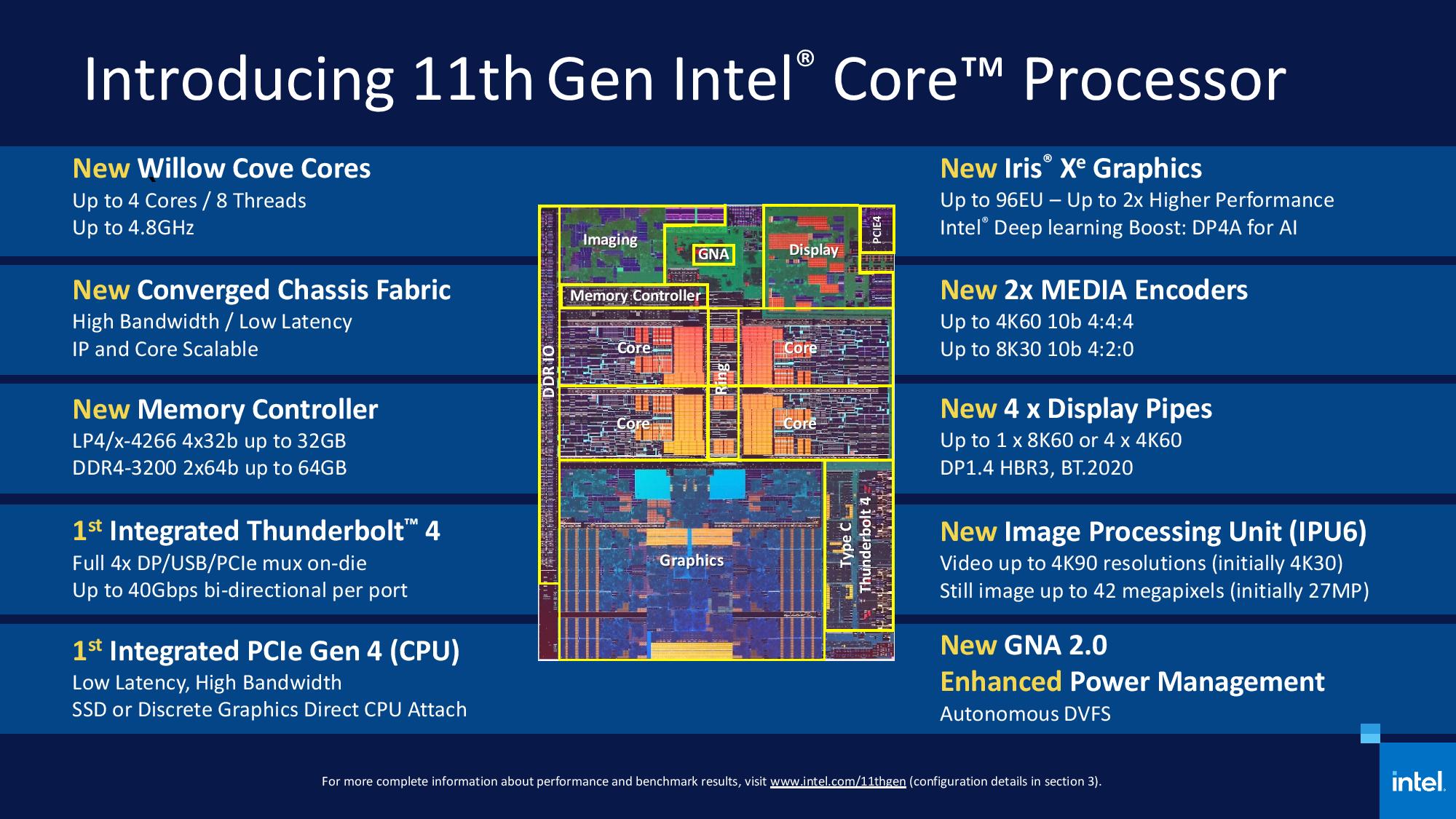
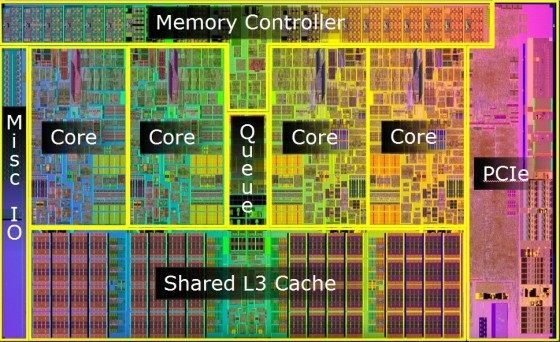
The chip image surprised me: where's the L3 cache? On previous generations, L3 cache was a significant amount of real estate. Is it no longer shared between cores?
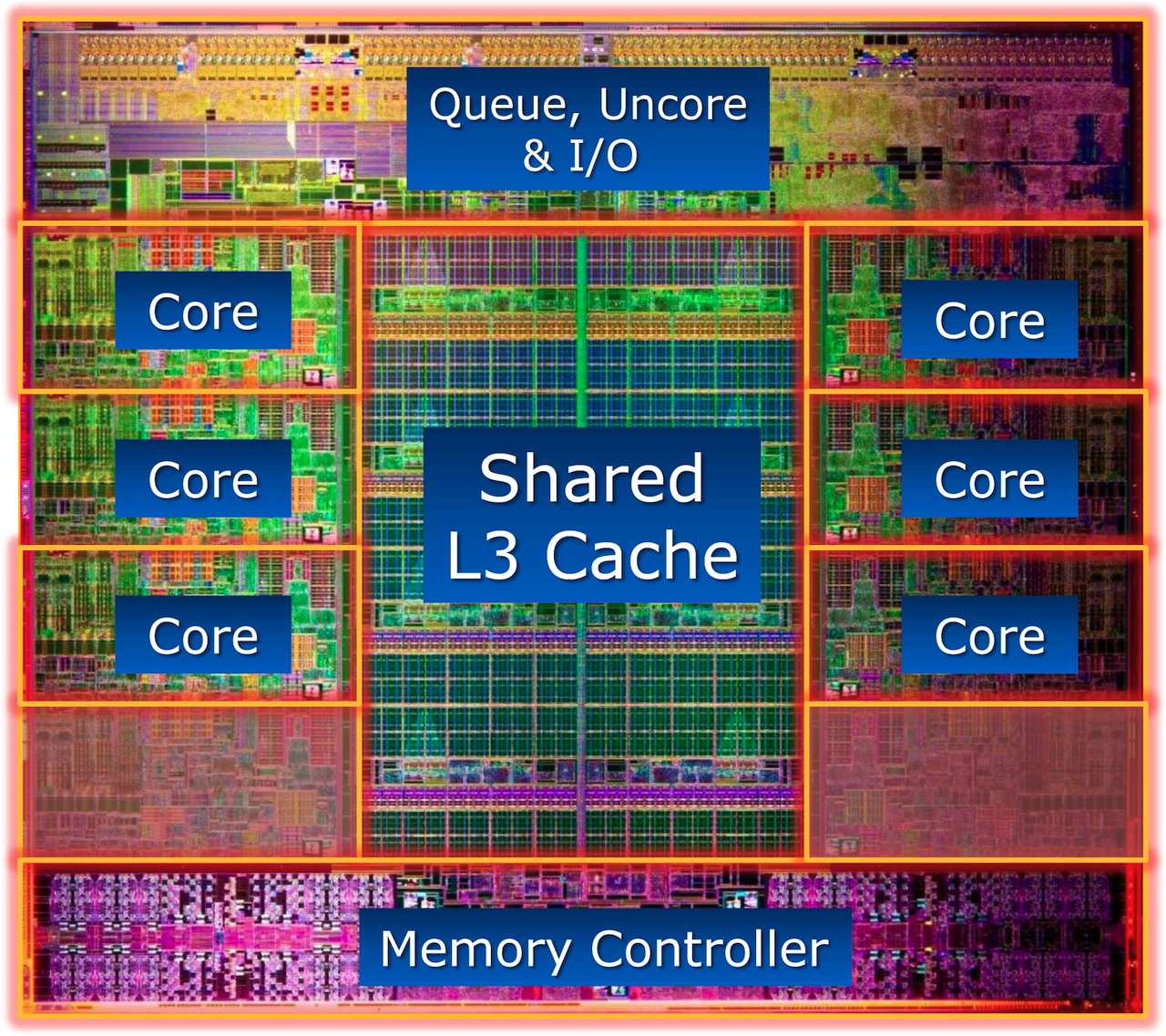
I don't see any coherent fabric blocks — what looks like large cache sections to my eyes are entirely inside the "Core" blocks. Maybe they're just not drawn correctly. Here are some much older i7s, for example:
Right, that was really my main question: besides the labeling (which is of course approximate), the positioning sure looks like each core would have its own "favorite" section of the cache. And being shared, it seems like this could make for some interesting performance behaviors.
Yeah, you need something like that to scale to large core counts, and especially if you wanna pull off some chiplet goodness (like AMD did with Ryzen). I think that's why it got lumped with the Fabric Interconnect layer in one of the block diagrams.
I wonder how much these will be deliberately crippled by laptop manufacturers putting them in systems with barely adequate cooling and/or turning down the power limits far below what they can actually handle.
I have heard others with relatively recent laptops say they see the CPU go into power/thermal limiting if they barely exercise it with a few seconds of compilation. The power limit can be worked around with utilities, the thermal one not so much...
Ultimately, Intel have the resources to compete with Nvidia. If they want to they'll have to set realistic expectations though (Intel's revenue is more than AMD's, Nvidia's, TSMC's combined - it takes more than money though)
The "flat" trend has infected it too, and it's unfortunate because the new logos look more like something from the fashion/cosmetics industry than a serious semiconductor company.
...still not as bad as what happened to Atmel's logo, however.
I wonder what would happen if Crytek released a version of the game that took "make it minimally require next year's hardware" to the extreme, and whether the meme would cause everyone to just either quietly buy new hardware, or declare a Vista-esque revolt.
I consider the i9-10900K good at that particular attribute! But it lacks the AVX-512 and is still that same architecture we've seen so many times now. i9-10900X has AVX-512, but is slower.
I'd love it all in one package, fast single threaded performance when needed, fast multithreaded compiles, and ability to experiment with and benefit from AVX-512 specific workloads
The Ice Lake-SP replacement to the Xeon W-3245 should hopefully be that, if you're looking for a workstation. 16 cores with hopefully a base clock around 3.4-3.5GHz with a single core turbo around 5.0GHz is what I'd expect. Along with the 64 PCIe 4.0 lanes and 8-channel DDR support.
Granted, workstation component pricing. Figure ~$650+ for a C621A chipset motherboard, and ~$2000 for the CPU without the massive (> 2TB) memory support.




Anecdote: a family member and software dev just bought the latest macbook pro coming from about an 8 year old macbook pro. Apparently he doesn't perceive much real world performance difference between the 2 machines. He said single core synthetic benchmarks were higher, but not by much.